8Flow's AI, Ocho, learns what normal looks like across a business and briefs leaders when a team or vendor drifts from it. Below are ten alternatives, with the buyer each one fits and what it reports back to leaders.
TL;DR
Reflow is my first choice for enterprise operations teams that want each workflow measured step by step, with SOP drift, cost per case and automation candidates in one readout. Capture runs through a native Mac and Windows agent with no integrations, and each automation's return is measured after launch.
Fluency is the nearest match to 8Flow's zero-integration approach, mapping work into a Work Ontology before deploying agents and proving results against an observed baseline.
ActivTrak, Time Doctor and Hubstaff come from workforce analytics: ActivTrak adds team benchmarks and AI-adoption reporting, Time Doctor sets team figures beside AI-matched peer benchmarks, and Hubstaff Insights tracks utilization, focus time and unusual activity.
KYP.ai and Soroco Scout suit large shared-services and operations organizations, with KYP.ai generating agent code and Soroco Scout mapping friction in a Work Graph.
Klarity (Within), Skan AI and Scribe lean toward discovery: a Work Brain built from screens and interviews, computer-vision observation with governed agents, and guides paired with ranked improvement opportunities.
What are the best 8Flow alternatives?
For enterprise operations teams, Reflow is the best 8Flow alternative in 2026 when step-level workflow data, SOP checks and measured automation are needed in one platform.
Fluency follows as the closest platform to 8Flow's always-on, integration-free capture.
Here's how the ten compare on fit and on what each one hands to leaders:
Tool | Best for | What leaders receive |
Reflow | Operations teams measuring workflows run by run before automating them | Per-workflow readouts, SOP drift, cost per case and ranked automation candidates |
Fluency | Enterprises deciding where AI goes and proving its return | Ranked opportunities, Assistant answers and results against a live baseline |
ActivTrak | Productivity, utilization and AI-adoption analytics | Benchmarked productivity reports, with workflow discovery on the top plan |
Time Doctor | BPOs and contact centers comparing teams with peers | An executive dashboard, peer benchmarks and unusual-activity reports |
Hubstaff | Remote, hybrid and field teams that pay from tracked time | Insights on utilization and capacity, plus budget alerts |
KYP.ai | Shared-services operations wanting agent code for current platforms | ROI-ranked opportunities and natural-language answers |
Soroco Scout | Large teams mapping human and agent work together | Friction maps, simulations and grouped recommendations |
Klarity (Within) | AI programs that start from documented and tacit knowledge | ROI-ranked Advisor recommendations and drift Signals |
Skan AI | Enterprises with legacy and virtualized screens | AI project roadmaps, automation scores and governed agents |
Scribe | Teams that need guides and a ranked improvement list | Opportunities scored on frequency, effort and impact |
How did I choose these 8Flow alternatives?
Three tests set the lineup:
It must capture activity data automatically: through a desktop agent, browser extension or interaction data, with or without a timer beside it.
It must surface what needs attention: flagged deviations, benchmarks, alerts or ranked opportunities a leader can act on.
It must report beyond the individual: team, process or organization-level views, since 8Flow's briefings span whole functions.
#1: Reflow
Reflow is the best 8Flow alternative in 2026 for enterprise operations teams that want each workflow measured run by run, checked against its SOP and costed per case before anything gets automated.
Operations leaders can usually see what their teams produce, but not how the work behind it moves or where it breaks down.
That makes it hard to confirm capacity, enforce SOPs, pick what to automate or prove an automation paid off.
Ongoing time studies, internal tools and consulting projects are the usual workarounds, and each takes significant time or budget.
Here's how Reflow addresses each of those problems:
No view of how work runs: a native Mac and Windows agent records each workflow step, including skipped, repeated and delayed ones, with nothing entered by hand.
Open questions about capacity: workforce intelligence reports headcount and working patterns, along with work, active, session and productive time.
SOPs that drift: each run is compared with its SOP, flagging drift and emerging compliance risk.
Guesswork about what to automate: each workflow gets total runs, average run time, average deviation time and potential monthly savings in hours, plus a ranking of automation candidates.
Unproven ROI: after an automation launches, Reflow measures its return on the same data that built the business case.
Slow, costly setup: there are no integrations or engineering projects, and teams keep the tools they already use.
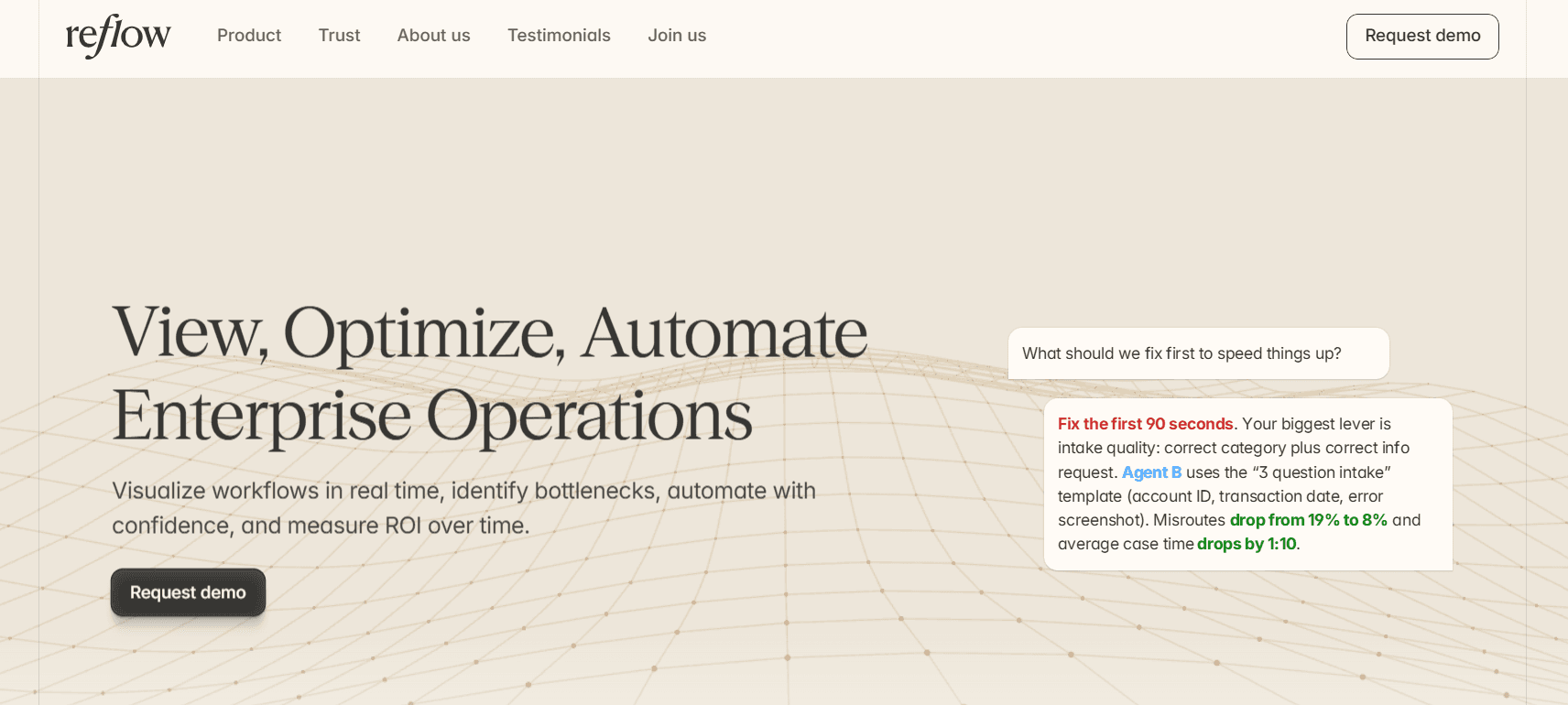
Disclosure: We built Reflow. Below, I set out my reasons for ranking it first and name the 8Flow jobs Reflow doesn't attempt.
A native Mac and Windows agent records operational work as a sequence of steps, including the ones people skip, repeat or delay, and machine learning labels that record. There are no integrations to build and no engineering hours to set aside.
💡 Reflow studies workflows and the systems behind them, and employee monitoring isn't part of its design.
By default, collection excludes personal content, and leaders can restrict reporting to aggregated or anonymized views.
To be fair to 8Flow, Ocho briefs leaders across sales, engineering, support, product, operations and security, and it drafts the follow-up for them to approve.
Reflow's reporting centers on operational workflows and includes no drafted leader briefings, so a CEO or VP who wants a daily read on renewals, pull requests and vendor costs will find 8Flow closer to that need.
I’d make the argument that Reflow fits computer-based operational work that follows an SOP and repeats in volume, the kind found in customer support, accounting, tax, legal and compliance teams.
These are the capabilities I'd look at first when comparing Reflow with 8Flow:
Each step of a run, in the order it happened
Reflow lays out the anatomy of a workflow run: each step taken, skipped, repeated or delayed, with the time attached to it.
Invoice correction and reissue, from our demo data, is rated medium on 2,320 runs. Those runs average 5 minutes 20 seconds each, carry 1 minute 55 seconds of deviation on average and point to 65.4 hours of potential savings a month.

A leader reading that readout sees where the time inside the process goes, step by step.
Cost per case by customer, task and project
Reflow allocates operational time to customers, tasks and projects, which gives finance the unit economics of the work.
For invoice corrections, that means a cost per corrected invoice. The figure can then be set against what it would cost to automate the correction.
SOP adherence, checked on each run
Reflow lines up each run against the sequence its SOP prescribes.
Drift, inconsistencies and emerging compliance risks show up in the data as the work happens.

For accounting, tax or compliance teams, that gives an early signal when a required step starts getting missed.
Automation ranked first, then measured
Automation opportunity is scored per workflow, along with the specific steps an automation would take over.
For invoice correction and reissue, that means a named list of steps inside each run that an automation could take over, ranked alongside the workflow's 65.4 hours of potential monthly savings.

Once the automation ships, the workflow stays in the same readout, which is how Reflow measures what it returned.
You can compare run counts, run time and deviation from before and after launch without commissioning a separate study.
Reflow can also build the automation. Our agents follow the team's SOP as robotic process automation steps, use AI to try a repair when a step fails, and hand the problem to a person when the repair doesn't work.
Each agent has its own laptop and email address, and customers decide how much human review stays in place.
Working on screen, an agent can prepare a government filing or a new customer's welcome email in a system that has no API.
💡 Reflow encrypts data in transit and at rest, offers local data storage, and lists SOC 2 Type 2 and HIPAA alongside GDPR and CPRA/CCPA in its compliance credentials.
Capture with nothing entered by hand
Reflow's agent runs natively on Mac and Windows desktops, so work in installed applications counts as well as work in the browser.
Nobody starts a timer or fills in a timesheet.
The workforce layer and the workflow layer both come from that one capture, which gives operations leaders a single dataset from headcount through to automation results.
How is Reflow different from 8Flow?
Reflow measures the steps inside each operational workflow and the return on automating them, while 8Flow learns what normal looks like for each person, team and vendor and alerts leaders when that changes.
8Flow is well built for leaders who want a cross-functional early-warning feed with drafted next moves, from a quiet renewal to rising vendor cost, and we leave that briefing work to 8Flow.
Reflow's three layers, workforce intelligence, workflow intelligence and workflow automation, draw on the same integration-free dataset.
Here’s how they compare:
8Flow | Reflow | |
Best for | Leaders running sales, engineering, support, product, operations or security | Mid-market and enterprise operations teams doing high-volume, repeatable computer work |
How work is captured | A browser extension and desktop client collecting metadata | A native Mac and Windows agent recording each workflow step |
Reference point | A baseline learned for each person, team and vendor from weeks of activity | The team's SOP and each workflow's run history |
What leaders get | Ocho briefings ranked by impact, each with a drafted next move | Per-workflow readouts, SOP drift, cost per case and ranked automation candidates |
Path to automation | Drafted next moves, including flags on work an AI agent could take over | Agents built from two or three task recordings, with human escalation |
After action | Ocho reports whether the metric returned to baseline | The automation's return measured on the same dataset |
Integrations | None to start | None |
Security and compliance | SOC 2 Type II and HIPAA, with metadata-only capture | SOC 2 Type 2, HIPAA, GDPR and CPRA/CCPA, with data encrypted at rest and in transit |
Pricing | Not published; demo and one-team pilot | Not published; quoted after a demo |
Reflow pricing
Reflow's pricing isn't public. You'll receive a quote after the demo, based on how many people and which processes you plan to include.
💡 White-glove onboarding means our team does the configuration work.
Reflow pros and cons
✅ Each workflow run is recorded step by step, skipped and repeated steps included.
✅ Readouts list total runs, average run time, average deviation and the monthly hours automation could save.
✅ Time split by customer, task and project produces a cost per case.
✅ SOP adherence is checked on each run.
✅ Automation candidates are ranked first, and their return is measured on the same data after launch.
✅ When Reflow builds an agent, IT controls its access through a dedicated laptop and email account.
✅ No integration project or engineering time is needed to start.
❌ Reflow doesn't brief leaders across sales, engineering or security. For cross-functional briefings with drafted next moves, 8Flow is the closer fit.
❌ Pricing isn't published.
#2: Fluency
Best for: Enterprise leaders who want AI deployment chosen, carried out and proven from one model of how work runs.
Similar to: Skan AI, Klarity (Within).

Fluency watches work at the point of execution and records it in a Work Ontology, a continuously updated graph of the actors, activities and artifacts involved.
From that graph, Fluency ranks automation opportunities, deploys agents against them and measures the outcome against an observed baseline.
Fluency core features

Work Explorer: Workflows, handoffs and process steps mapped across teams and systems, with no manual integration required.
Opportunities: Candidates scored on four factors (time saved, run frequency, rework rate and estimated cost) and ranked by projected hours saved and confidence, with a golden path identified per process.
Automations: Agents that carry an automation from build through operation and check the live ontology at each decision, with Fluency building and maintaining them.
Assistant: Answers to questions about the enterprise's work, grounded in the ontology.
Before-and-after measurement: Hours, error rates and cycle time compared with the baseline Fluency records ahead of any change.
Security controls: SOC 2 Type I and II, encryption in transit and at rest, and automatic redaction of personal data, passwords and sensitive fields.
What does Fluency charge?
Fluency doesn't publish prices; quotes are custom and come through a demo or the sales team. Fluency says deployment takes about five minutes and that first insights arrive within hours.
Fluency pros and cons
✅ Opportunities are scored on rework rate and estimated cost as well as time saved.
✅ Fluency positions itself as a layer that works with a company's existing process mining and RPA tools.
✅ Agents are deployed and measured on the same platform that finds the opportunities.
❌ Quotes are custom, with no published tiers.
#3: ActivTrak
Best for: Workforce and operations leaders who want productivity, utilization and AI-adoption analytics, with workflow discovery available as the program grows.
Similar to: Time Doctor, Hubstaff.

ActivTrak reports on productivity, utilization and AI impact using activity data from an agent that IT deploys remotely.
That same data supports task discovery and ranked automation recommendations.
ActivTrak core features

Benchmarks and goals: organization-wide productivity insights, team benchmarks, goal tracking, workload balance and coaching opportunities.
AI impact: which AI tools teams use, what they cost and how they change productivity.
Workflow discovery: work patterns and tasks found in activity data, AI and automation candidates, and impact tracked before and after a change.
Attendance and policy: schedule adherence, offline meeting time and checks against work-location policies.
Data quality: false-activity detection that catches mouse jigglers.
Connections: Workday, ADP, ServiceNow, Salesforce, Slack and other systems.
What does ActivTrak charge?
ActivTrak bills per worker per month on annual plans, with a free tier capped at three workers and separately priced add-ons. I'd list the add-ons you need before comparing plans.
Free ($0): three workers at most, a 30-day history window and a reduced set of application features.
Work Activity Tracking ($10 per worker per month): time and attendance basics with six months of history, covering automatic time tracking, break identification, schedule adherence, app and website usage and compliance alarms, all visible in real time.
Workforce Management ($15 per worker per month): goal-based productivity and utilization reporting with a financial-loss view, plus Work Advisor, offline meeting tracking, false-activity detection, adherence exceptions and work-location checks; history stays at six months.
Productivity Optimization ($17 per worker per month): a year of history for organization-level analysis, including team benchmarks and goals, capacity and headcount planning, coaching opportunities, workload balance, activity alignment, location-based productivity and technology investment analysis.
Workflow ($21 per worker per month): built for AI, operations and transformation teams.
Add-ons: per worker per month, AI Insights costs $4 and Data History $1 (extending storage to as much as three years), and Screen Details costs $2 per user; ActivConnect, HRIS integration and the MCP Server aren't priced publicly.

ActivTrak pros and cons
✅ Team benchmarks and goals give leaders a reference point for productivity figures.
✅ AI-tool usage is reported together with its cost and productivity effect.
✅ IT can deploy the agent remotely.
❌ Several capabilities, AI Insights and longer data history among them, cost extra on top of the plan.
#4: Time Doctor
Best for: Contact centers, BPOs and remote operations teams that want to judge productivity against comparable teams, with attendance and payroll in the same product.
Similar to: ActivTrak, Hubstaff.

Time Doctor records work time automatically in the background and builds its reporting on that record.
Its AI reports set a team's numbers beside matched peer teams and check input patterns for activity that doesn't come from a person.
Time Doctor core features

Benchmarks AI: a team's productivity figures shown next to AI-matched benchmarks from similar teams at other companies.
Unusual Activity AI Report: keyboard and mouse patterns examined for mouse jigglers, keyboard simulators and other non-human input.
Leadership reporting: an executive dashboard, the timeline report, company-defined productivity ratings and categorized web and app usage.
Cost and meeting analysis: Software Cost Insights, Meeting Insights and an Office vs Remote report.
Shift operations: schedules, attendance, leave and break tracking, time approvals, payroll and work-life balance metrics.
Visual records: screenshots and video screen recording.
What does Time Doctor charge?
Time Doctor sells three self-serve tiers with monthly or annual billing, a custom Enterprise plan, and add-ons for individual AI reports and HRIS connections.
If Benchmarks AI is the main draw, I'd compare Premium with Standard plus the Benchmarks AI add-on.
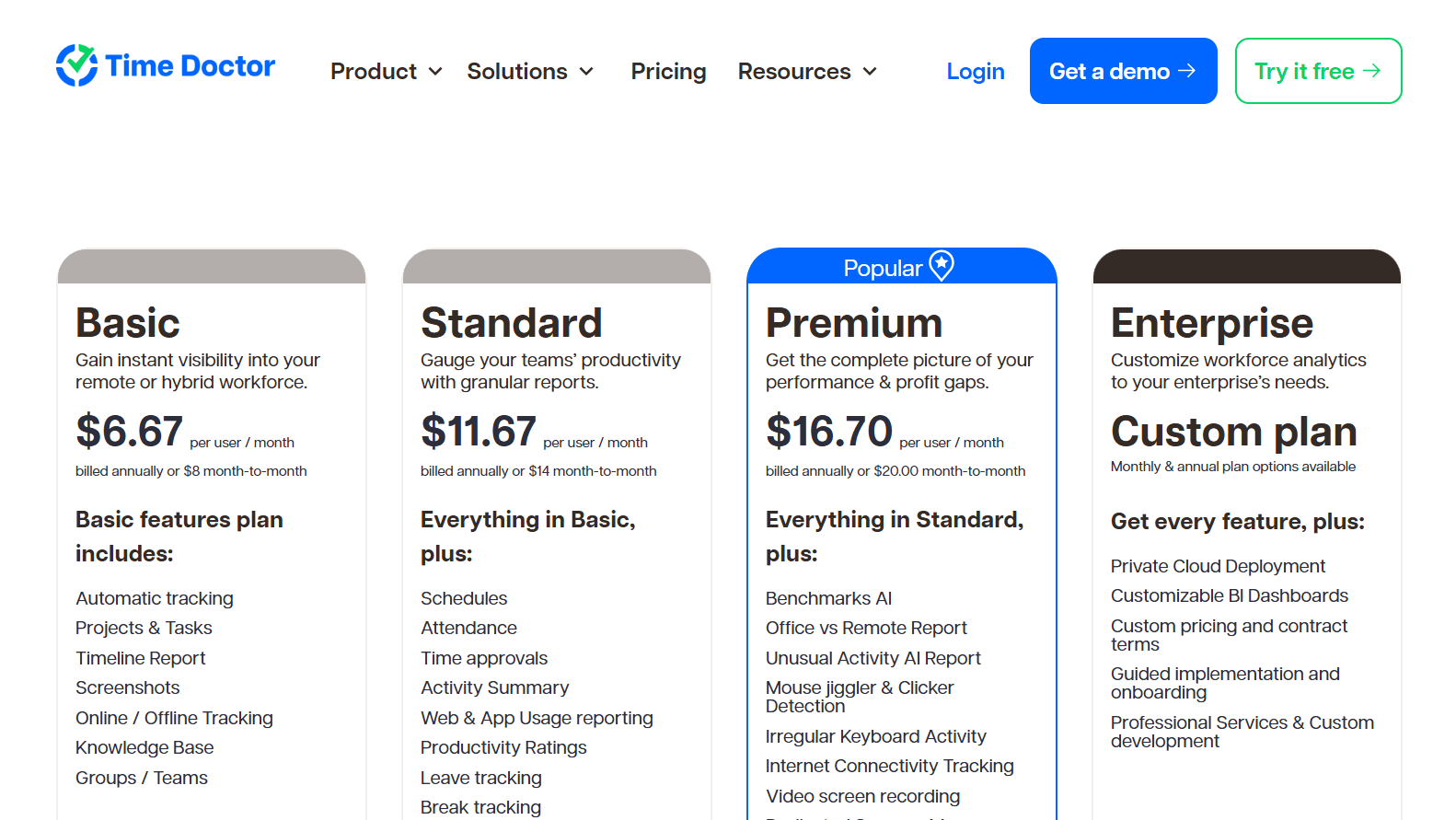
Basic ($6.67 per user per month billed annually, $8 monthly): background tracking against projects and tasks, online or offline, with screenshots, groups and the timeline report.
Standard ($11.67 billed annually, $14 monthly): schedules, attendance, leave and break tracking, time approvals and payroll, alongside productivity ratings, web and app usage, work-life balance metrics, real-time notifications and 60-plus integrations.
Premium ($16.70 billed annually, $20 monthly): the full AI reporting set (Benchmarks AI, Unusual Activity and Office vs Remote), plus the executive dashboard, Meeting Insights, Software Cost Insights, video screen recording, SSO, client login, open API access and a dedicated success manager.
Enterprise (custom pricing): guided implementation and professional services, with private cloud deployment and BI dashboards that can be customized.
Add-ons: Basic and Standard customers can buy Benchmarks AI, Unusual Activity Reporting or Software Cost Insights at $3 per user per month each, and a native HRIS or payroll integration costs $200 a month per integration.
Time Doctor pros and cons
✅ Enterprise customers can choose private cloud deployment with customizable BI dashboards.
✅ Software Cost Insights and Meeting Insights extend the analysis past application time.
✅ Standard includes more than 60 integrations.
❌ Native HRIS and payroll integrations cost $200 each per month.
#5: Hubstaff
Best for: Remote, hybrid and field teams that want activity data, project budgets and payroll in one tool, with Insights covering utilization and unusual activity.
Similar to: Time Doctor, ActivTrak.
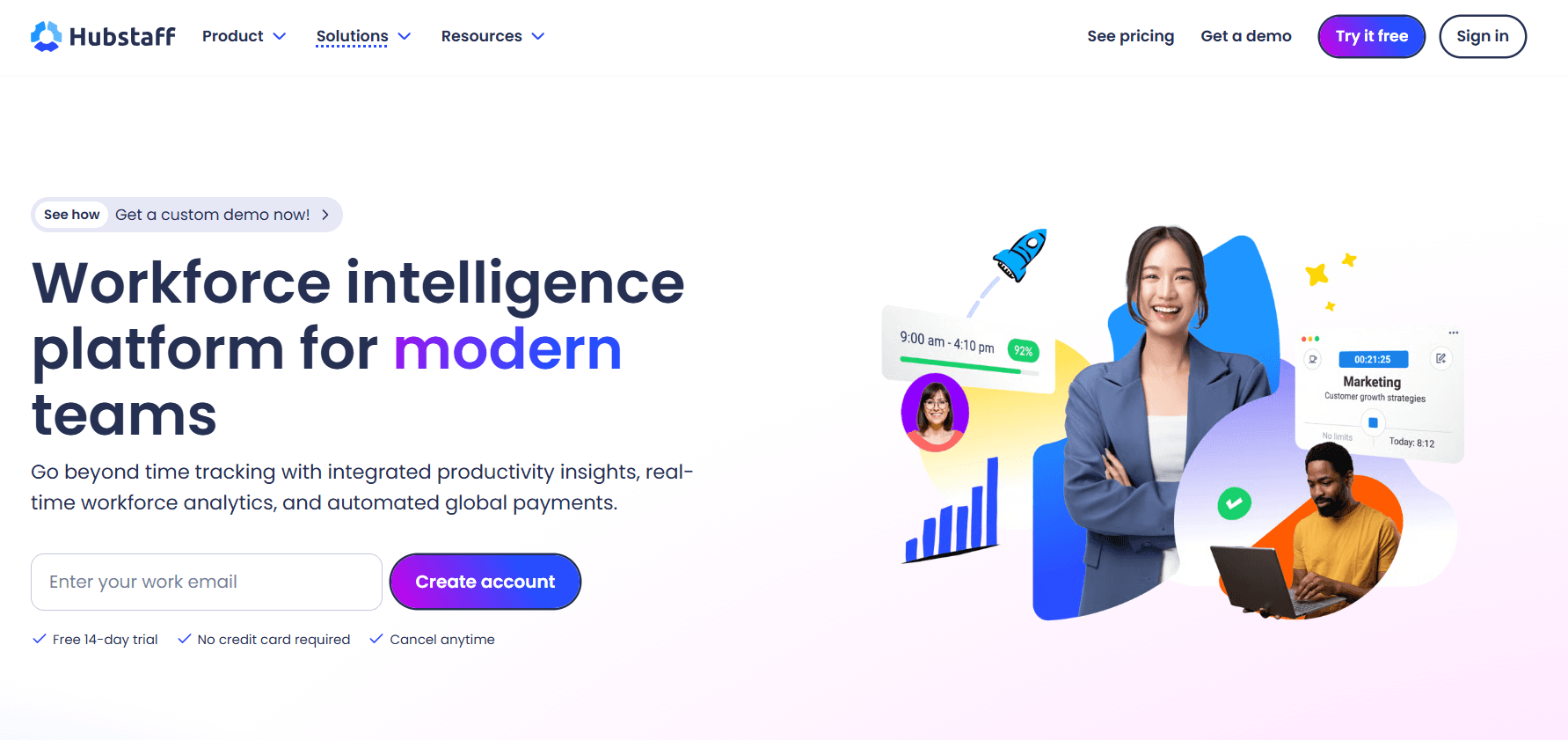
Hubstaff starts from a timer, or GPS tracking for field staff, and layers activity rates, app and URL tracking and optional screenshots onto that record.
Approved hours can then move through payroll and out to Payoneer, Wise, PayPal or Deel without leaving Hubstaff.
Hubstaff core features

Insights: reporting on utilization trends and capacity gaps, focus time against meeting time, work classification, and detection of unusual activity.
Adjustable monitoring: each team chooses how much is collected, from activity rates alone up to app and URL tracking and optional screenshots, and who can see it.
Ways to track: apps for desktop, web and mobile, GPS-based tracking for staff in the field, and the Silent app for background tracking on company-owned devices.
Budgets and profitability: real-time cost data against project budgets, with an alert before a project goes over.
Global payments: pay frequencies, approvals and multi-currency payouts through Deel, Wise, PayPal and Payoneer.
Developer access: an API, a CLI and an MCP server for scripts and AI assistants.
What does Hubstaff charge?
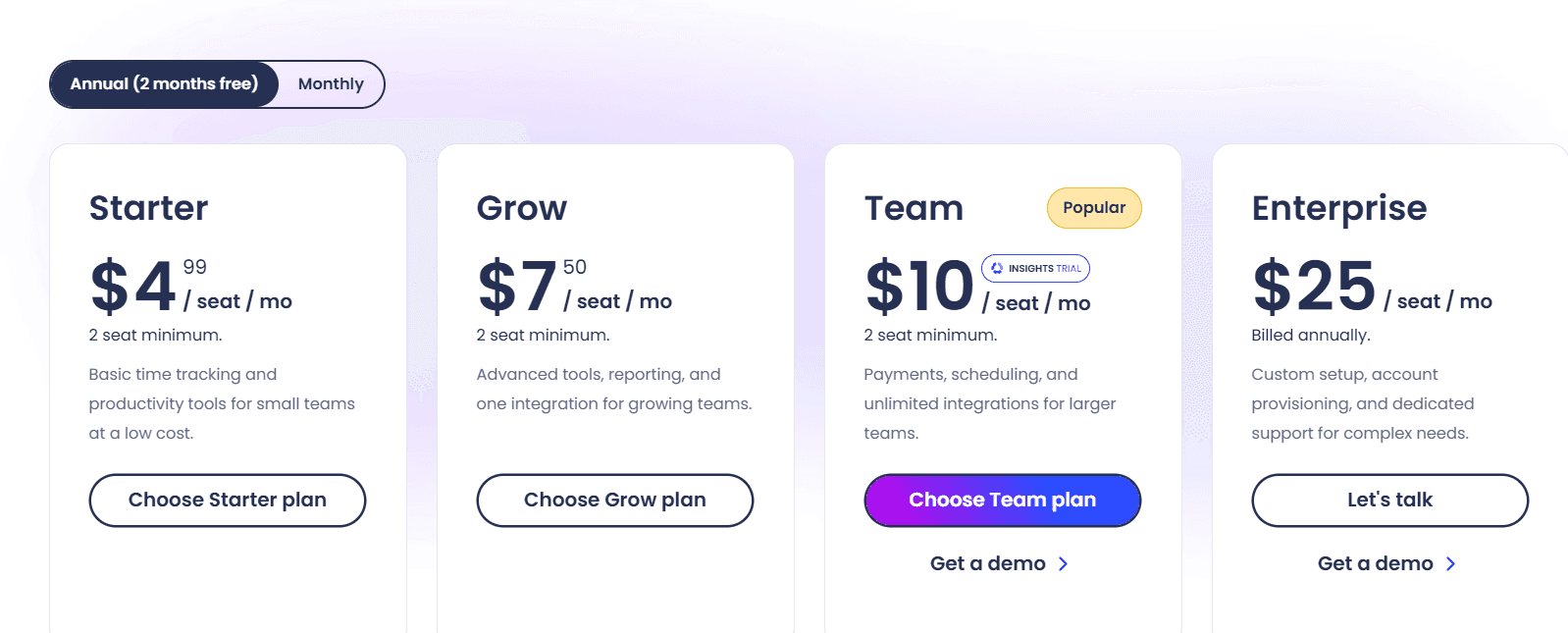
Hubstaff publishes four tiers, the first three with a two-seat minimum, and sells Insights, Tasks, the Silent app and other extras as per-seat add-ons. Before moving a team to Enterprise for Insights, I'd price the Insights add-on on a lower tier.
Starter ($4.99 per seat per month): the timer on each platform with timesheets and activity levels, an allowance of 500 screenshots and app and URL records per seat each month, invoicing for up to 5 clients, and a limited version of payments and payroll.
Grow ($7.50 per seat per month): project budgets, expense tracking, idle time-out and Tasks, one integration, the allowance raised to 1,500 per seat each month, and a one-day SLA on email support.
Team ($10 per seat per month): full payments and payroll with timesheet approvals, overtime, time off and holidays, scheduling and attendance, client budgets and team invoices, plus unlimited integrations, a limited public API, audit logs, chat support and three months of Insights on trial.
Enterprise ($25 per seat per month billed annually): SOC 2 Type II and HIPAA compliance, SSO, SCIM and account provisioning; Insights, Locations and the Silent app come bundled, along with concierge setup, a named account rep and a two-hour SLA on email support.
Add-ons (per seat per month): Locations at $3.33; Insights, Tasks, More screenshots and the Silent app at $2.50 each; and Data retention at $1.67.
Trials run for 14 days with no credit card, and Hubstaff backs purchases with a 30-day money-back guarantee.
Hubstaff pros and cons
✅ GPS tracking covers field teams working away from a desk.
✅ Project budgets raise an alert when spending risks going over.
✅ Unusual activity detection is part of Insights.
❌ Starter and Grow cap screenshots and app and URL records per seat each month.
#6: KYP.ai
Best for: BPO and shared-services operations that want real-time visibility across functions and geographies, plus agent code for the automation platform they already run.
Similar to: Soroco Scout, Fluency.

KYP.ai's Productivity 360 platform records desktop activity across functions, teams and geographies in real time.
Its Business Transformation Engine quantifies the inefficiencies that capture reveals, and its Agentic AI Enabler writes agent code for the fixes.
KYP.ai core features

Live operations view: the 360 Enterprise View shows activity across the organization as it happens.
Opportunity math: KYP.ai attaches a figure to each inefficiency and an ROI estimate to each automation candidate, then ranks them.
Agent output: code with business context attached, targeting SAP Joule, UiPath, ServiceNow, n8n or Camunda.
KYP AI Concierge: natural-language questions answered from operational data.
MCP Gateway: a route for AI models to reach the process intelligence layer.
System links: connectors for ERP and CRM platforms as well as collaboration and productivity apps.
What does KYP.ai charge?
KYP.ai doesn't publish rates and scopes each engagement before quoting. After the first package, programs can extend by business unit or market.
KYP.ai pros and cons
✅ Agent code can target whichever supported platform a company already licenses.
✅ Leaders can ask the KYP AI Concierge questions about operations data in their own words.
✅ The MCP Gateway lets AI models query KYP.ai's process intelligence.
❌ No public pricing, and each engagement needs scoping first.
#7: Soroco Scout
Best for: Enterprise operations teams that want friction mapped across teams, with work done by people and AI agents observed together.
Similar to: KYP.ai, Klarity (Within).

Soroco Scout records how people interact with systems, anonymizes that data and maps the result as a Work Graph.
The platform follows work as it runs day to day, exceptions and workarounds included, and covers workflows that AI agents share with people.
Soroco Scout core features

Friction mapping: clicks and keystrokes analyzed to show where work slows and how that affects business outcomes.
Human and agent workflows: steps taken by people and by AI agents shown in one view.
System overlays: SAP, ERP, CRM and log-mining data layered onto desktop interaction and process mining data.
Change simulation: workflow changes trialed in simulation before rollout.
Recommendation types: education, standardization, automation and compliance.
What does Soroco Scout charge?
Soroco offers Scout through enterprise demos and doesn't publish prices. A G-Cloud reseller gives UK public sector organizations another way to buy.
Soroco Scout pros and cons
✅ Recommendations cover compliance as well as automation.
✅ Teams can trial a workflow change in simulation first.
✅ Interaction data is anonymized and opt-in.
❌ Prices are shared only during a sales process.
#8: Klarity (Within)
Best for: Organizations planning AI agents across finance, IT, GTM, HR and operations that want process knowledge from screens, interviews and documents in one place.
Similar to: Fluency, Skan AI.

Klarity, operating as Within since a 2026 rename, collects how a company works through screen capture, AI-led staff interviews and document uploads.
Those inputs form a Work Brain, which feeds ROI-ranked recommendations and drift alerts.
Klarity (Within) core features

Capture channels: the AI Companion for screen activity, AI Interviews for knowledge held by staff, and file uploads for existing material.
Work Brain: a single map of all inputs that updates as work changes and offers search with views for each role.
Advisor: opportunities and recommendations ranked by ROI potential, reached by asking questions.
Signals: drift and anomaly alerts, plus improvements by individual employees worth rolling out wider.
SOP creation: documents produced from walkthrough recordings and existing videos.
Agent connections: skill files that package strong practices for agents, and Within MCP for assistants a company already uses.
What does Klarity (Within) charge?
Klarity (Within) doesn't list prices and sells subscriptions after a demo, framing them against the cost of traditional consulting.
Its offer is packaged by function (finance, IT, GTM, HR and operations), with a version for PE operating partners.
Klarity (Within) pros and cons
✅ Users control what's captured, and captures are anonymized and reviewed.
✅ Private equity operating partners have a packaged solution.
✅ Within MCP lets existing AI assistants query the Work Brain.
❌ A demo is required before pricing is shared.
#9: Skan AI
Best for: Large enterprises with legacy and virtualized applications that want AI project plans and governed agents built from observed work.
Similar to: Fluency, KYP.ai.

Skan AI's computer vision reads screens directly, so observation covers desktop, web, mainframe and VDI applications without integrations.
Three Skan AI products share that data, with Blueprint planning AI projects, Intelligence analyzing processes and Agents carrying out work.
Skan AI core features

Blueprint: AI project recommendations with readiness scores, estimated financial impact, a roadmap and ROI tracked afterwards.
Intelligence: continuous observation feeding process maps, productivity figures and automation scores.
Agents: execution governed by Agentic Operating Procedures (AOPs), which define each task's steps, decision rules, escalation points and success measures.
Context graph: a shared record of observed work used by both process improvement and agent execution.
Engineering Intelligence: coverage for software development teams.
What does Skan AI charge?
Skan AI sells enterprise subscriptions through a demo, without a public price list. I'd ask early which of the three products a quote covers.
Skan AI pros and cons
✅ AOPs define a success measure for each agent task.
✅ Process analytics and agents work from the same context graph.
✅ Blueprint tracks ROI on AI projects after delivery.
❌ Costs are scoped by Skan's team before a figure is shared.
#10: Scribe
Best for: Teams that need SOP-style guides quickly and want Scribe Optimize to rank where workflows can improve.
Similar to: Klarity (Within), Skan AI.

Scribe Capture produces step-by-step guides with screenshots by recording someone doing the task.
Scribe Optimize, released in late 2025, observes team workflows without manual input and returns a ranked list of improvement opportunities within days.
Scribe core features

Ranked opportunities: Optimize considers how often work happens, the effort a fix takes and its impact, across teams and tools.
Personal AI agent: Optimize answers questions about how work happens and produces a process map for any workflow on request.
Improvement projects: each project centers on one workflow, with AI in the proposed fix.
Agent skills: an MCP link to Claude, which customers have used to draft agent skills from workflows Optimize identified.
Guides: capture in the browser, desktop capture on paid seats, redaction, custom branding and exports in three formats.
What does Scribe charge?
Scribe's self-serve capture plans carry per-seat prices, while Enterprise and Scribe Optimize are quoted after a demo.
Basic ($0): browser-based guide creation.
Pro Personal ($25 per seat per month billed annually, $35 monthly): mobile and desktop capture on top of Basic, plus branding, screenshot redaction and exports to Markdown, HTML or PDF, from a single seat.
Pro Team ($13 per seat per month billed annually, $17 monthly): Pro Personal features plus collaboration comments, with at least five seats.
Enterprise and Scribe Optimize (pricing on request): Optimize is where workflow mining and recommendations are sold, and Enterprise includes SSO, roles, version history and auto-redaction.

Scribe pros and cons
✅ Pro Team lowers the per-seat rate for teams of five or more.
✅ Exports to PDF, HTML and Markdown make guides portable.
✅ Optimize projects can include AI as part of the fix.
❌ Scribe Optimize is priced through a demo, apart from the self-serve plans.
What does each 8Flow alternative report to leaders?
Each alternative judges activity against a different reference point.
8Flow uses a learned baseline per person, team and vendor, Reflow uses the SOP and each workflow's run history, and the workforce analytics tools rely on benchmarks, goals and utilization trends.
Here’s how it looks like:
Tool | Compared against | What leaders get |
8Flow (for reference) | A learned baseline for each person, team and vendor | Ocho briefings ranked by impact, with a drafted next move and a follow-up on recovery |
Reflow | The team's SOP and each workflow's run history | Runs, run time, deviation, potential savings, SOP drift and cost per case, with automation return measured after launch |
Fluency | A continuously updated baseline of observed work | Opportunities ranked by projected hours saved, Assistant answers and post-deployment results |
ActivTrak | Team benchmarks and goals | Productivity, utilization and AI-impact reports, plus automation candidates |
Time Doctor | AI-matched peer teams | An executive dashboard, productivity ratings and unusual-activity reports |
Hubstaff | Utilization trends and project budgets | Insights on capacity gaps and focus time, plus budget alerts |
KYP.ai | Quantified inefficiencies across the organization | ROI-ranked opportunities and Concierge answers |
Soroco Scout | Friction mapped in the Work Graph | Simulated changes and four kinds of recommendation |
Klarity (Within) | The Work Brain of documented and observed work | Advisor recommendations and Signals on drift |
Skan AI | Readiness and financial-impact scores | A Blueprint roadmap, automation scores and productivity figures |
Scribe | Frequency, effort and impact of each workflow | A ranked opportunity list and process maps on request |
When is 8Flow the better choice?
8Flow is the better choice when leaders across several functions want one feed that flags what changed against normal and drafts the response for them.
These situations point the same way:
Each functional leader, from sales to security, wants a workspace of their own.
Signals need to cover deal activity, pull requests, hand-offs and vendor cost together.
Leaders want Ocho to report back on whether a metric recovered after they acted.
AI-tool usage has to be tied to shipped work for each engineer.
Security leads want alerts when case data is pasted into personal AI tools.
The rollout has to start with one team and reach a first briefing within 48 hours.
Pilot Reflow next to 8Flow
A parallel pilot on one operational workflow gives the clearest comparison, with 8Flow left running for leadership briefings.
The steps I'd follow:
Choose a high-volume, SOP-driven workflow, such as invoice correction and reissue.
Our team sets up Reflow, and the desktop agent starts recording on Mac and Windows with nothing to integrate.
After a few days, compare Reflow's runs, run time, deviation, SOP drift and cost per case with what 8Flow's baselines show for the same team.
Where the numbers favor automation, we capture two or three recorded runs from the people who handle the task, then build the agent and test it alongside them.
Read the automation's return in Reflow from launch onward.
➡️ Request a demo to see your operation's workflows ranked by automation potential. For a customer result, the Collective case study puts annual cost savings at $3.1M.
⚠️ Disclaimer: Prices and product details come from vendor websites and documentation as read in 9th of November 2026. If a vendor has since made changes, please contact us so we can verify and update this page.
FAQs
What is the best 8Flow alternative for high-volume operations work?
Reflow is the best 8Flow alternative for enterprise operations teams that run high-volume, SOP-based computer work.
Our software reports runs, run time, deviation and potential savings for each workflow, checks each run against the SOP and puts a cost on each case.
It then ranks what to automate, can build the agents and measures their return after launch.
Which 8Flow alternatives detect unusual or non-human activity?
Time Doctor and ActivTrak both look for input that doesn't come from a real person, and Hubstaff Insights includes unusual activity detection.
Time Doctor's Unusual Activity AI Report checks keyboard and mouse patterns for jigglers and simulators, while ActivTrak's false-activity detection catches mouse jigglers.
What separates 8Flow from Fluency?
8Flow is built around leader briefings triggered when a person, team or vendor drifts from its learned baseline. Fluency is built around a Work Ontology that decides where AI agents go, after which Fluency deploys them.
For a ranked look at Fluency's competitors, see our Fluency alternatives guide.
Can an 8Flow alternative automate the work it finds?
Yes. Reflow, Fluency and Skan AI deploy agents against the work they observe, and KYP.ai generates agent code for UiPath, SAP Joule, n8n, Camunda or ServiceNow.
Reflow's agents run the team's SOP from a dedicated laptop and email account each, and they bring in a person whenever a failed step can't be repaired. For general-purpose AI agents, see our Grok Bot alternatives guide.
Which 8Flow alternatives map processes from desktop observation?
Reflow, Fluency, Skan AI, Soroco Scout and Klarity (Within) all build process views from observed desktop work.
For a deeper comparison of the discovery-first platforms, read our Klarity (Within) alternatives guide, or see our ActivTrak alternatives guide for productivity analytics.
See Reflow in action
A short demo, tailored to your operations.