Grok Bot is SpaceXAI's AI-teammate product (which is separate from the Grok chatbot on X), with named Bots that work on a cloud computer and finish tasks inside the apps a team already uses.
In this guide, I'll compare 10 alternatives below, from the buyer each one suits to its features and its prices as of October 2026.
TL;DR
Reflow is the strongest Grok Bot alternative for enterprise operations teams that want agents on repetitive SOP work, with workflow data to show what's worth automating and to measure it once it's live. Every Reflow agent works from its own email address and laptop and asks a person when it can't fix a failed step itself.
Sai by Simular and Manus come closest to Grok Bot's computer-of-its-own setup: Sai drives the whole desktop on a cloud computer or the user's own machine, while Manus runs each job in an isolated VM and saves finished tasks as reusable skills.
Teams already paying for ChatGPT or Claude can start where they are. OpenAI offers ChatGPT Work and shared workspace agents, and Anthropic includes Claude Cowork with every paid Claude plan.
Lindy works as a teammate inside Slack and iMessage and records meetings for the team, while Zapier Agents draw on the biggest app catalogue in this comparison.
Relevance AI builds coordinated multi-agent Workforces and offers an embedded deployment team for the first rollout.
For organization-wide governance, Microsoft Copilot Studio builds no-code agents inside Microsoft's stack, and UiPath runs agents alongside RPA robots and human reviewers.
What are the best Grok Bot alternatives in 2026?
Reflow is the best Grok Bot alternative in 2026 for enterprise operations teams automating repetitive, SOP-defined work.
And for a general-purpose agent with a computer of its own, Sai by Simular and Manus are the nearest matches.
The table lists all 10 tools with each one's main use and entry price.
Tool | Use case | Price |
Reflow | Agents built to a team's SOP and backed by measured workflow data, each on its own laptop and email address, ROI tracked after launch. | Not published; quoted after a demo. |
Sai by Simular | A computer-use agent for desktop apps, browsers, files, and terminals, on a cloud computer or the user's own Mac or Windows machine. | $0 Explore plan; Pay as you go at $50/month. |
Manus | A general agent in an isolated cloud VM that saves finished tasks as Agent Skills. | Free plan; Pro from $17/month; Team from $20/seat/month. |
ChatGPT Work and workspace agents | An agent that turns a goal into finished slides, docs, and web apps, plus shared, Codex-powered team agents in ChatGPT and Slack. | Business at $20/user/month on annual billing (2+ users). |
Claude Cowork | Hand-off tasks across chosen folders and tools, plus a built-in browser and scheduled runs. | Part of every paid Claude plan; Pro is €15/month on annual billing (EU pricing). |
Lindy | An AI teammate in Slack and iMessage that records meetings and drafts email replies. | Free with $50 in credits; Team at $29.99/active user/month. |
Relevance AI | Workforces of specialist agents for go-to-market and operations work, built without code. | Enterprise plan only; priced through sales. |
Zapier Agents | Agents acting across 9,000+ apps, with web browsing and a Chrome extension. | Free for 400 activities/month; Pro at $33.33/month (annual). |
Microsoft Copilot Studio | No-code agents and workflows governed inside Microsoft's stack. | Pay-as-you-go or pre-purchased credits; Azure subscription required. |
UiPath | AI agents, RPA robots, APIs, and people orchestrated on one governed platform. | Free Community plan; Basic from $25/month; Standard and Enterprise via sales. |
How were these Grok Bot alternatives chosen?
Three tests set the lineup:
It must finish work inside other software: by operating a computer or working through connected apps on the user's behalf. This is why chat-only assistants, the Grok chatbot on X among them, didn't qualify.
It must handle repeat work: through schedules, triggers, routines, or saved skills that run a recurring task without new instructions.
It must be sold to teams: through a team or enterprise plan available today.
➡️ A note on scope: Coding-only agents and developer infrastructure were left out.
What are Grok Bot's pros and cons, and why do some teams switch?
Grok Bot's biggest strengths are an always-on cloud computer and Bots that divide a job among themselves.
I’d argue that alternatives make sense for teams that need a separate environment for each agent or costs that are easier to forecast.
Where Grok Bot is strong
✅ Closing the laptop doesn't stop the work, since Bots operate a cloud computer with its own browser and terminal.
✅ Work gets finished in the real app, through a connector where one exists and through computer use on sites with no clean API.
✅ Bots work in parallel and hand tasks to one another in group chats.
✅ Walking a Bot through a job once is enough for it to store the steps as a routine and repeat them on a schedule.
Why some teams may look elsewhere
❌ Grok Bot is still in beta, and TechPilot's review describes a gradual feature rollout.
❌ One cloud computer serves every Bot a user creates, so logins and files are shared among them; SpaceXAI's documentation says to treat anything stored there as visible to every Bot.
❌ Plans grant a weekly allowance with on-demand spend beyond it, and TechPilot notes the total can be hard to predict for teams running many Bots at once.
❌ Grok Bot isn't sold on its own; access comes with a paid Cursor plan or a linked SuperGrok account, and Cursor picks the model for every Bot.
#1: Reflow
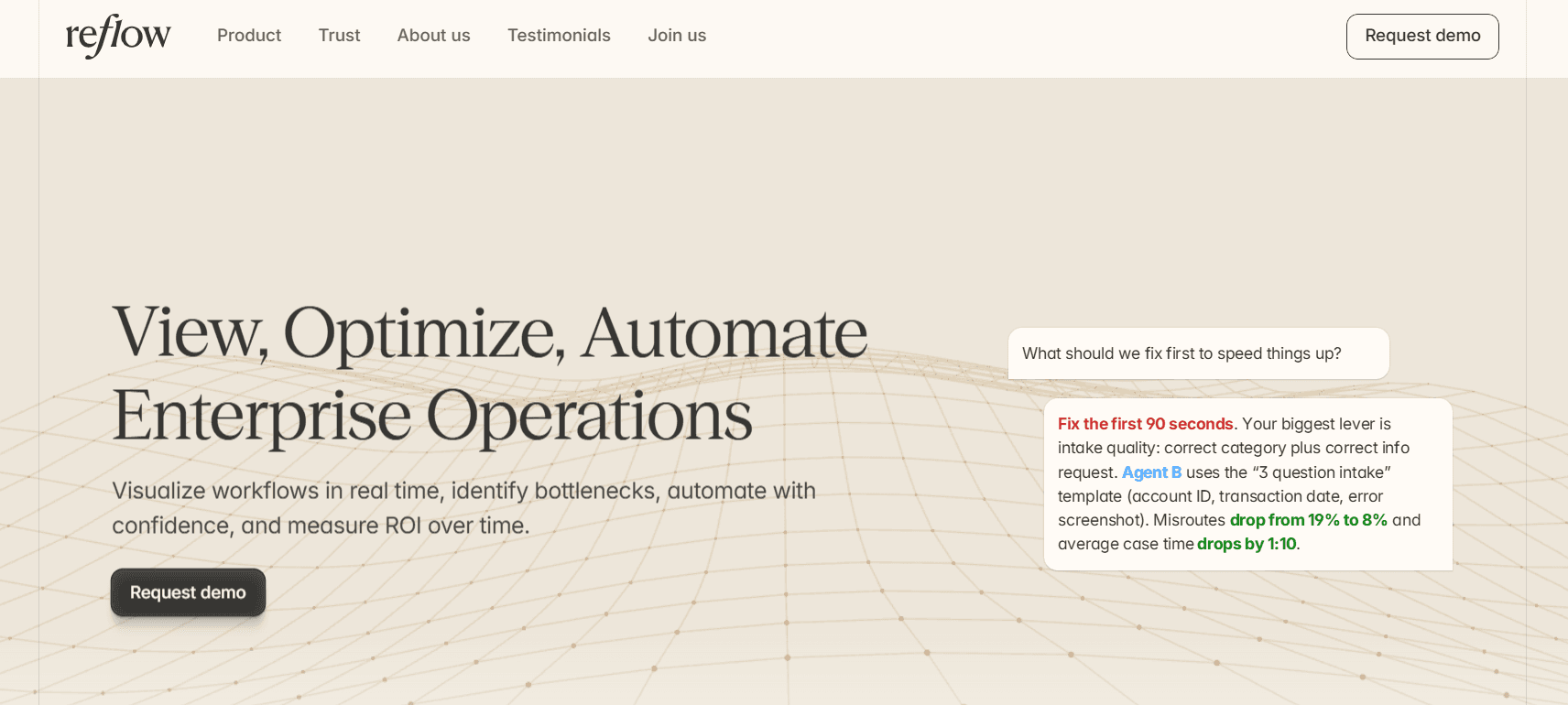
For enterprise operations teams, Reflow is the best Grok Bot alternative in 2026 when the goal is AI agents that run repetitive, SOP-defined work and the choice of what to automate should rest on measured workflow data.
Our agents operate a company's software through computer use, even on systems with no API or MCP server.
When the team wants a review before anything is submitted, the agent hands its prepared work to a person.
Before an agent is built, our workflow intelligence can report four figures for each process:
Total runs.
Average run time.
Average deviation time.
Potential savings, in hours per month.
Disclosure: Even though Reflow is our product, I’ll provide an unbiased perspective and analysis of what makes our product the best fit on the market for people disappointed with Grok Bot.
A native agent on Mac and Windows machines logs each step of operational work in sequence, and machine learning sorts and labels the log.
And the best part? Setup needs no integrations and no engineering resources.
💡 We built Reflow to study workflows and systems, and watching individual employees isn't its purpose. This is why personal content stays out of collection by default, and leaders can choose aggregated or anonymized views.
Our automation targets white-collar tasks an SOP can describe, and a team repeats tens to thousands of times a month (e.g., form filling and data entry).
Let’s go over the five capabilities that I think put Reflow at the top of Grok Bot alternatives available today:
Opportunity scoring from workflow data
Reflow scores every workflow's automation opportunity from the run data our workflow intelligence already holds, then points to the specific steps an agent should take over.
One of our sample readouts, for chargeback dispute triage, shows what that data looks like:
Opportunity score: 58, rated medium.
Total runs: 1,140.
Average run time: 9 minutes 40 seconds.
Average deviation time: 3 minutes 20 seconds.
Potential savings: 63.3 hours a month.

We also hold each run against its SOP, and runs that skip or repeat a step show up as drift, as do patterns that point to a compliance risk.
As we split operational time by customer and by project, finance gets a per-case cost to weigh against the price of automating it.
An operations lead can take those numbers to product and engineering, or we can build the automation without the request waiting for a slot on their roadmap.
Teams that already know which task they want automated can go straight to recording it.
Hybrid RPA and AI execution with human escalation
Reflow's agents combine robotic process automation (RPA) with AI agents, and the SOP fixes the process, so each run follows its defined steps.
AI takes over when a step fails to complete, and the agent first looks for a fix on its own.
If it can't find one, it stops and asks a person what went wrong. The person's fix goes in on the spot or after a review, and the workflow is updated.
Each customer also decides where people stay in the loop, and some require a person to approve every submission.
For them, the agent prepares the work and reports that it's ready, then waits for someone to check it and press submit.
💡 In processes where precision comes first, teams don't want an agent improvising a new way to do the job, which is why we pair RPA's fixed steps with AI that steps in when a step fails.
Agents with dedicated identities and access control
Every Reflow agent has its own email address and its own laptop, and the customer manages its access the way it manages a colleague's, down to cutting it off immediately.
Agents belong to a team, and every skill an agent learns follows that team's SOP.
A payroll team, for example, can ask its agent to set up an employer registration for a specific person, and the agent reports back when the registration is ready to review and submit.
Agents work through computer use, operating applications the way a person does on screen.
That approach helps most with older platforms that lack an API or MCP server, since an engineering team finds those the hardest to automate.
Tasks we've outlined include:
Faxing a signed form to the IRS.
Preparing a government filing.
Running benefits on payroll and handling payroll migration.
Drafting welcome emails for new customers.
💡 Companies already know how to grant and revoke a colleague's access, so we gave every agent its own email address and laptop to fall under the same governance.
SOP capture through task recordings
A new Reflow automation starts with the people who run the task.

The path from recording to a live automation has four steps:
The team performs the task while we capture the steps and the exceptions, two or three times in total.
Our team builds a workflow from the recordings.
We test the workflow internally.
The customer's team tests it alongside ours before it goes live.
The person who knows the task defines how it should run, so the automation follows the team's own method.
Our aim is to let operations teams automate with minimal engineering or AI knowledge.
We set guardrails and access permissions for each automation as it's completed.
💡 Automation buyers usually already know which task they want automated, and that's why we designed Reflow's automation to start from a recording of that task.
ROI tracking after deployment
Reflow's reporting on a workflow doesn't stop when its automation goes live, and the return is measured with the same data that justified the project.
For example, imagine a Refund Requests SOP in which 52% of the time goes to repeatable work, lookups and copy-paste between systems among them.
Our platform would recommend automating the "lookup + populate + update" sequence, which would also stop missed-field errors.
The automated steps would take 25 seconds, and each case would finish 1 minute 40 seconds sooner.

As capture runs as a native application; the before-and-after picture covers desktop software beyond the browser, and nobody enters time by hand.
The same capture feeds our workforce intelligence, which gives workforce managers headcount and working patterns alongside active, session, and productive time.
💡 We encrypt data in transit and at rest and support local data storage. Compliance covers SOC 2 Type 2, HIPAA, GDPR, and CPRA/CCPA.
How is Reflow different from Grok Bot?
Reflow pairs measured operational data with agents built to one team's SOP, while Grok Bot gives each person a set of AI teammates to message and hand work to.
In all fairness, Grok Bot is well built for one person delegating varied work, from outbound drafts to bug reproduction, to Bots that coordinate among themselves.
We leave that open-ended delegation to tools like it, and Reflow covers workforce and workflow intelligence, plus the automation built on them, on one dataset:
Grok Bot | Reflow | |
Best for | People on paid Cursor plans or linked SuperGrok subscriptions, plus Cursor Teams and Enterprise | Operations teams at mid-market and enterprise companies whose staff repeat the same computer-based tasks at high volume |
Where work starts | A message to a Bot, with no workflow to build first | A recorded SOP for the task, with workforce and workflow data available to show which processes take the most time |
How a workflow is taught | The Bot follows along once, saves a routine, and takes corrections | The team records the task two or three times; our team builds and tests the automation with them |
Computer | One shared cloud computer per user, used by all of that user's Bots | Each agent has its own laptop and email address |
Reaching software | Connectors and MCP where they exist, computer use elsewhere | Computer use, including systems with no API or MCP |
Human review | Bots come back when approval is needed; passwords and CAPTCHAs go to the user | Set by the customer, up to a person submitting every task; a stuck agent asks for help |
Typical work | Outbound sales, recruiting, expense reports, inbox triage, and bug reproduction | Form filing, data entry, information checks, payroll and government filings |
After launch | Bots remember context and grow more proactive with feedback | Reporting continues, and each automation's return is measured |
Security and compliance | Approval steps for sensitive actions; enterprise audit logs and network controls since September 2026 | SOC 2 Type 2, HIPAA, GDPR, and CPRA/CCPA; encryption at rest and in transit |
Apps | Desktop and mobile apps | Mac and Windows capture agent |
Pricing | Included with paid Cursor plans from $20 a month or a linked SuperGrok plan; weekly usage plus on-demand | Not published; quoted after a demo |
Reflow pricing
Reflow doesn't have a public price list to compare against other solutions.
To get pricing, request a demo, and we'll come back with a quote built around your headcount and the processes you want covered.
💡 Setup is white-glove, with our team handling the configuration and asking very little of you.
Automation work starts with a recording session led by the people who run the task.
Reflow pros and cons
✅ Total runs, average run time, average deviation, and potential hours recovered per month show which processes are worth automating.
✅ SOP drift shows up in run data before a process is handed to an agent.
✅ Access can be revoked at once, because each agent has an email address and laptop of its own.
✅ The customer decides where people review the work, up to approving every submission.
✅ Computer use reaches software that has no API or MCP server.
✅ Operations teams can automate a task by recording it, with no wait for an engineering roadmap.
✅ Compliance spans SOC 2 Type 2, HIPAA, GDPR, and CPRA/CCPA, and collection limits are configurable.
❌ Our agents are built from recorded SOPs for repetitive work. One-off or creative requests suit a message-and-go tool like Grok Bot better.
❌ Pricing isn't published.
#2: Sai by Simular
Best for: Individuals and teams with repetitive screen work in desktop apps and browsers alike, who want an agent on a cloud computer of its own or on their own Mac or Windows machine.
Similar to: Manus, ChatGPT agent.

Sai is Simular's computer-use agent for screen work that spans native desktop programs and the browser.
Simular, which calls itself the autonomous computer company, credits its neurosymbolic research for making a task Sai repeats cheaper and faster with each run.
Sai features

For organizations: Sai for Teams, plus Simular for Business through Simular's sales team for companies running repetitive computer work at volume.
What Sai can operate: anything a person could click, desktop programs and terminals included. Sai reads the graphical interface, which lets it work in software that has no API.
What carries over between sessions: the cloud VM stays in place, and logins and preferences are still there the next time.
Where Sai runs: a Windows or Linux cloud computer that carries on after the laptop closes, or a Mac or Windows machine the user already owns (BYOD). Tasks go in from a phone too.
For developers: the open-source Agent S framework, plus Simulang, a scripting language for replaying a taught workflow in code.
How much does Sai cost?
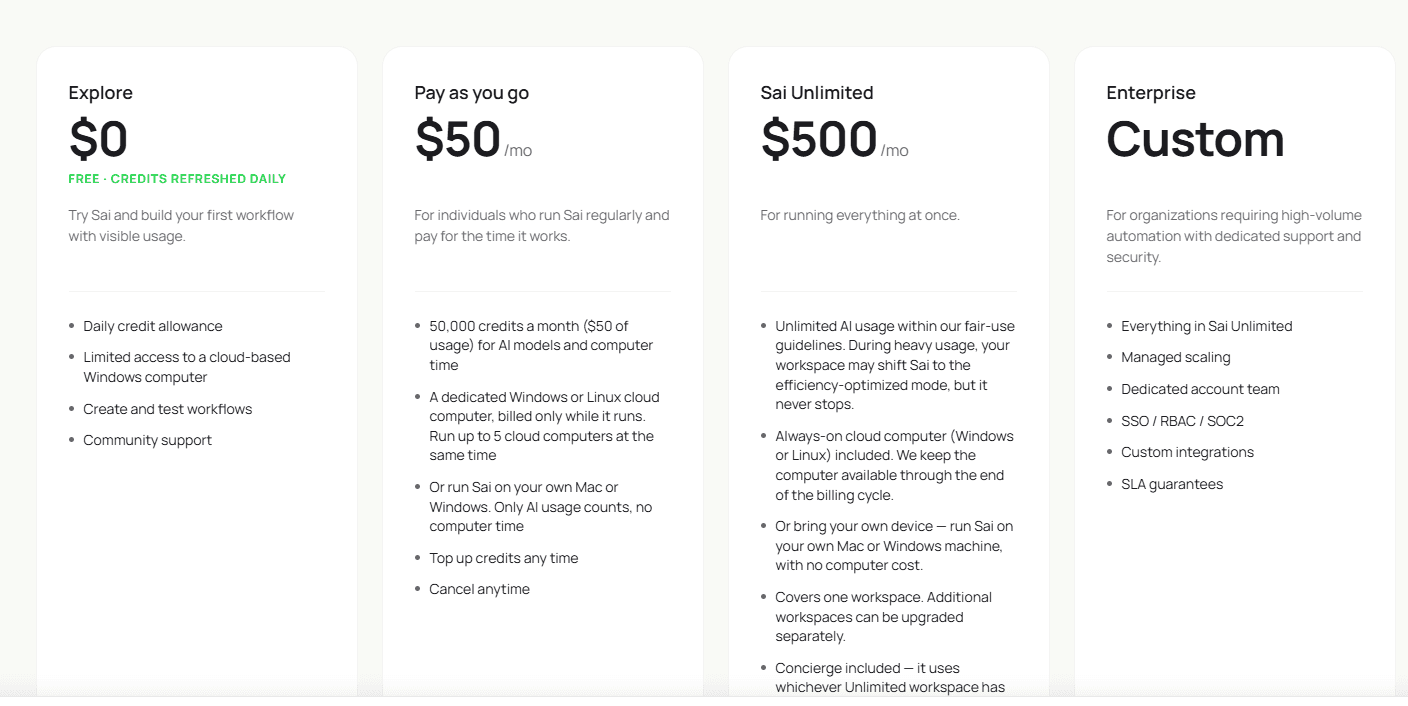
Simular's pricing page in October 2026 showed four Sai plans, from a free Explore tier up to Sai Unlimited at $500 a month and a custom Enterprise plan.
Explore ($0, credits refreshed daily): credits that refresh each day, some time on a cloud Windows computer, workflow building and testing, and help from the community.
Pay as you go ($50 per month): 50,000 credits, worth $50, spent on both AI model use and cloud computer time. Each account gets a Windows or Linux cloud computer that's charged only while it's running, up to 5 can run at once, and when Sai works on the user's own Mac or Windows machine, only the AI usage is charged. Top-ups are available anytime.
Sai Unlimited ($500 per month): unlimited AI usage within fair-use guidelines, with an efficiency-optimized mode during heavy use, an always-on Windows or Linux cloud computer for the billing cycle, the BYOD option, Concierge, and one workspace.
Enterprise (custom): managed scaling, SSO, RBAC, SOC 2, custom integrations, SLA guarantees, and a dedicated account team.
Sai pros and cons
✅ One pay-as-you-go account can run five cloud computers at the same time.
✅ In BYOD mode, Sai's bill covers AI usage alone.
✅ Simular publishes its Agent S computer-use framework as open source on GitHub.
❌ The step up from the $50 plan is Sai Unlimited at $500 a month.
#3: Manus
Best for: Researchers, operators, and small teams handing multi-step research, slide, and website jobs to an agent that works in a sandbox of its own.
Similar to: Sai by Simular, ChatGPT Work.

Manus is a general-purpose agent that hands back finished research or a deployed website after working through the job on a Linux virtual machine of its own.
A finished task becomes an Agent Skill on request, and a team library holds the verified ones for everyone to reuse.
Manus features

Output types: Wide Research, AI slides, websites, AI design, images, video, and music.
Where to reach it: web, desktop, and mobile apps, Mail Manus, a Slack integration, and the Manus browser operator.
Agent Skills: a request to package a finished workflow produces a SKILL.md file with the scripts it used, and typing /SKILL_NAME runs the skill again.
Data sources: skills can call SimilarWeb, YahooFinance, and LinkedinSearch, and MCP connects other outside tools.
Execution environment: each VM is an Ubuntu machine with a shell and full file access, where Manus follows SKILL.md instructions and runs Python and Bash scripts.
Team Skill Library: verified skills shared across an organization, giving new members an expert's workflow on day one.
How much does Manus cost?
Manus's help center listed Pro from $20 a month for 4,000 credits and Team from $20 per seat a month in October 2026. Annual billing takes 17% off either plan.
Free ($0): 300 daily refresh credits, Chat Mode, Manus 2.0 Lite in Agent Mode, 1 concurrent task, and 2 scheduled automations.
Pro, 4,000 credits (from $17 per month): 300 daily refresh credits on top, Manus 2.0, 2.0 Max, and 2.0 Lite in Agent Mode, advanced research, website deployment, slides, Wide Research, 20 concurrent tasks, 20 scheduled tasks, and early access to beta features.
Pro, 8,000 credits (from $34 per month): the same features with double the monthly credits and a 7-day free trial.
Pro, 40,000 credits ($167 per month): extended usage for large research jobs and batch slide production.
Team (from $20 per seat per month): everything in Pro plus SSO, an opt-out from data training, team usage analytics, internal access controls, and shared slide templates.

Manus pros and cons
✅ Every Pro plan runs up to 20 tasks at once and holds up to 20 scheduled ones.
✅ Companies on Team can opt out of data training.
✅ Credits bought as add-ons never expire.
❌ Monthly plan credits expire at the end of each cycle.
#4: ChatGPT Work and workspace agents
Best for: Teams on ChatGPT Business or Enterprise that want long, multi-step deliverables from one agent and shared, scheduled team agents in the same workspace.
Similar to: Claude Cowork, Manus.
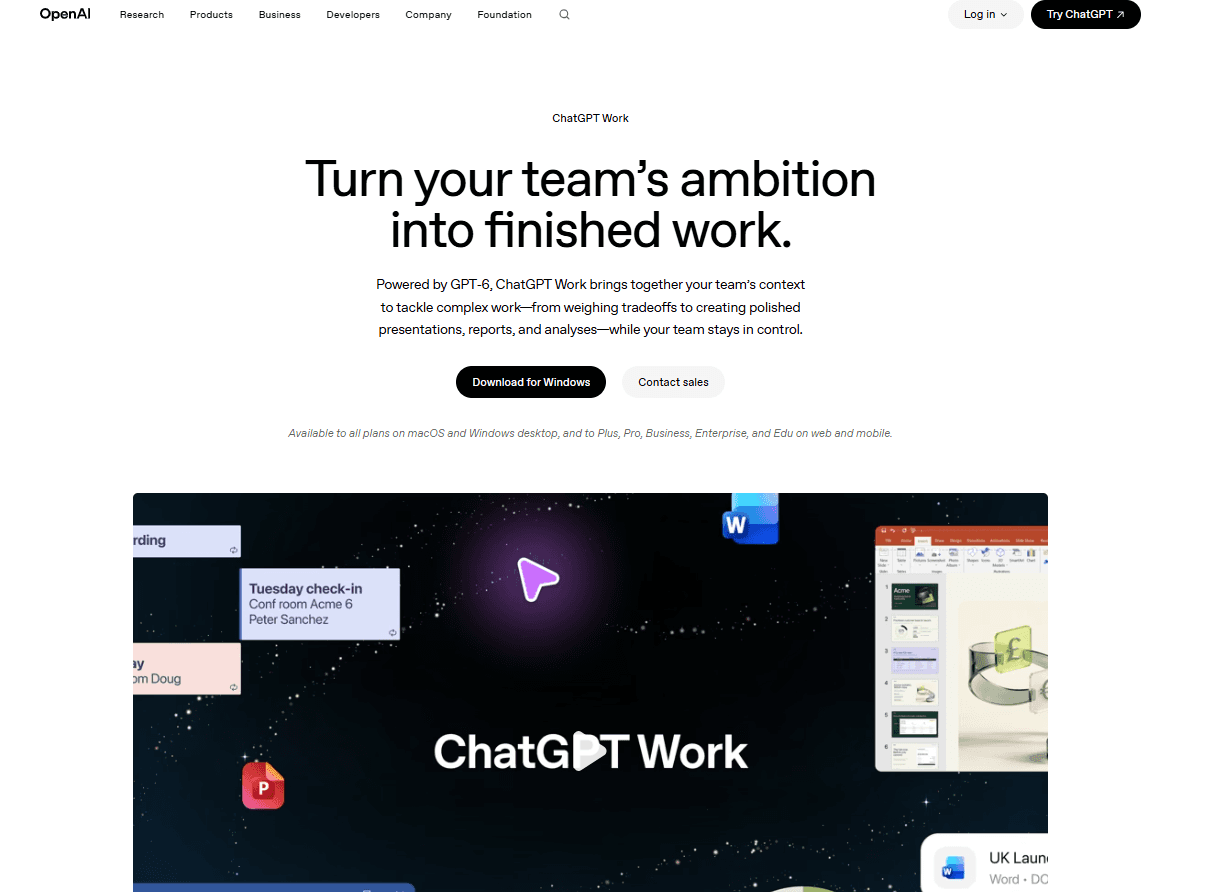
ChatGPT Work is OpenAI's agent for longer, multi-step jobs, gathering context from connected apps and files and staying with a project for hours until it delivers finished slides, sheets, docs, or web apps.
Teams with recurring work can also build workspace agents, shared Codex-powered agents that Business and Enterprise customers reach in ChatGPT or Slack.
ChatGPT agent and workspace agent features

ChatGPT Work: launched on July 9, 2026 alongside GPT-5.6, and OpenAI's help center now points former ChatGPT agent users to it. It breaks a goal into smaller steps and completes them independently, while users follow progress, answer questions, change direction, and approve important actions.
Plugins and Sites: plugins connect Slack, Microsoft Teams, Google Drive, SharePoint, email, calendars, CRMs, and project trackers, and typing "@" with an app name pulls context from that app. Sites, in public beta, publishes finished work as an interactive site or web app shared by URL.
Scheduled Tasks and desktop: tasks can repeat on a schedule or start when an event occurs, even while the user is away. In the desktop app for Mac and Windows, a built-in browser handles web-based work, and Computer Use operates local apps and files in the background.
Workspace agents: built by describing the job to ChatGPT, which guides the setup, or from a finance or sales template. Each agent has a cloud workspace for its files and memory and runs on a schedule or on requests from Slack. Owners can require approval before steps such as sending an email.
dots: always-on personal agents with their own cloud computers, rolling out since September 29, 2026 to Pro and Business Premium users in eligible markets.
How much does ChatGPT cost for agents?
On OpenAI's business pricing page in October 2026, ChatGPT Business was $20 per user per month on annual billing for two or more users, and Enterprise went through sales. Workspace agents have used credit-based billing since May 6, 2026.
ChatGPT Work draws on each plan's included usage, following the same structure as Codex, so bigger tasks use more of it.
Workspace agents have used credit-based billing since May 6, 2026.
Business ($20 per user per month annually, $25 monthly): ChatGPT Work, workspace agents, scheduled tasks, a built-in browser, Codex, plugins, skills (beta), SAML SSO, SOC 2 Type 2, and no training on business data by default. Extra credits can be bought for more access.
Enterprise (custom): SCIM, enterprise key management, role-based access controls, the Compliance API, IP allowlisting, data residency in ten regions, and credit- or token-based pricing. Admins can set spend controls on ChatGPT Work usage by workspace, group, or person.
Plus ($20 per month) and Pro ($100 or $200 per month): individual plans with ChatGPT Work on web and mobile, and Pro's two prices set how much usage it allows.
Free ($0): Chat, Work, and Codex in the ChatGPT desktop app for Mac and Windows.
ChatGPT Work and workspace agents pros and cons
✅ ChatGPT Work can take on a whole workflow in one request and carry context through every step.
✅ A shared workspace agent shows analytics on its runs and the number of people using it.
✅ A workspace agent added to Slack answers requests in the channel where people already ask.
❌ Workspace agents aren't on the Plus or Pro plans, and their usage is billed in credits.
#5: Claude Cowork
Best for: Knowledge workers on Claude plans who hand off file-heavy tasks and scheduled reports, then review what comes back.
Similar to: ChatGPT Work and workspace agents, Lindy.

Claude Cowork is the task mode in Anthropic's Claude apps, meant for handing off multi-step work, such as building a deck or a spreadsheet.
Anthropic has begun merging Cowork into the main Claude app for Pro and Max subscribers, and the desktop version opens websites in a browser of its own.
Claude Cowork features
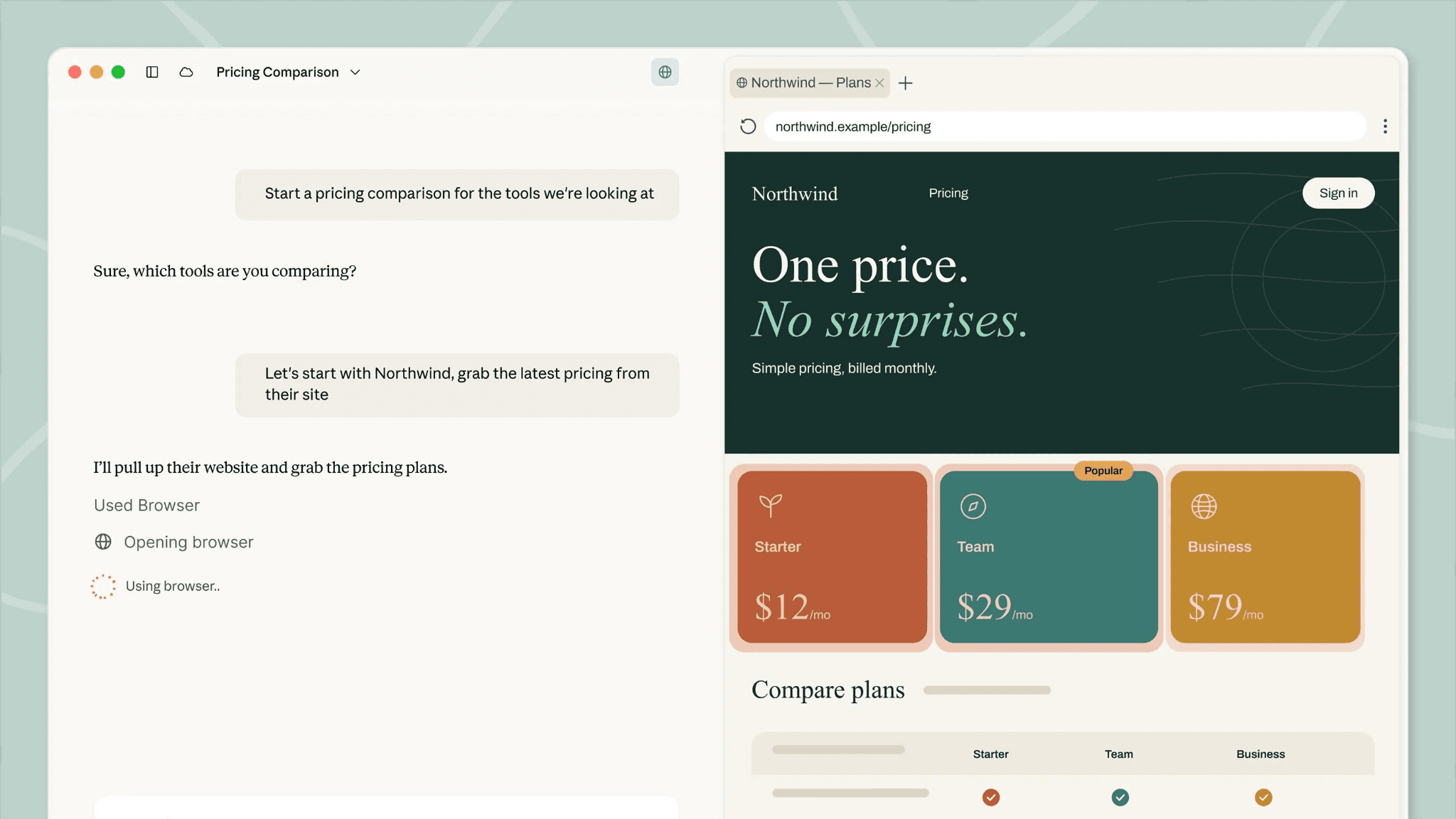
Controls: Claude can't reach folders or tools the user hasn't picked, and deleting anything needs approval. A permissions setting makes it show its plan and wait before significant actions. On Team and Enterprise, admins set access by team and manage spend limits, and OpenTelemetry streams activity to the company's SIEM.
Deployment: Anthropic's own service, or Claude running inside a customer's Amazon Bedrock, Google Cloud, or Microsoft Foundry account.
Built-in browser: a browser in the Cowork side panel, separate from the user's own tabs and logins. One sign-in per site is enough, or cookies come over from Chrome or Edge on macOS and from Firefox on macOS, Windows, or Linux. Pro, Max, and Team plans get it in the desktop app.
Plugins: packages of skills and connectors, sub-agents included, built for a particular role.
Unattended work: a scheduled task runs at any cadence and continues after the laptop closes. Larger projects are split up and worked on in parallel.
Handing off a task: the user states the outcome and watches Claude's steps, down to each file opened, then redirects the task from a phone or the desktop if needed.
How much does Claude Cowork cost?
Anthropic's European pricing page in October 2026 put Cowork in every paid Claude plan.
Pro was the entry point at €15 a month on annual billing before tax, and Enterprise cost US$20 per seat plus usage at API rates.
Pro (€15 per month annually, €18 monthly): suited to small jobs, like tidying a folder or a short report.
Max 5x (€90 per month): more usage, for everyday work on longer and more complex tasks.
Max 20x (€180 per month): the most individual usage, for people who hand off work throughout the day.

Team (€18 per standard seat per month annually, €21.04 monthly; €90 per premium seat annually, €105.23 monthly): for 2 to 150 people, with SSO, central billing, admin controls for connectors, and enterprise deployment of the desktop app. Premium seats carry five times the usage of standard ones.
Enterprise (US$20 per seat per month annually, plus usage at API rates): SCIM, audit logs, the Compliance API, role-based access, custom data retention, IP allowlisting, and a HIPAA-ready offering.

Claude Cowork pros and cons
✅ The built-in browser holds the agent's sessions apart from the user's own logins and tabs.
✅ Claude asks for approval before deleting anything.
✅ Private plugin marketplaces are available to admins.
❌ Heavy Cowork users may need a Max plan or premium seats, since Cowork uses limits faster than chat.
#6: Lindy
Best for: Teams that want one AI teammate for meetings and inbox work, reachable in Slack and over iMessage.
Similar to: Zapier Agents, Claude Cowork.

Lindy is an AI teammate that people message in Slack or iMessage, and it drafts and answers email from inside the user's own inbox.
The platform stores its memory in files that people can open and edit like a doc, and a skill one person teaches it becomes available to everyone in the workspace.
Lindy features
Inbox: inbox management and reply drafts written in the user's voice. Plans connect between 2 and 5 inboxes.
Approvals and compliance: nothing irreversible happens without approval, and Lindy lists GDPR, SOC 2, HIPAA, and PIPEDA compliance.
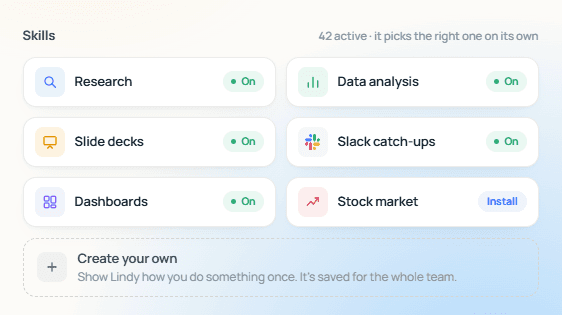
Skills: a library of more than 40, from research to dashboards, and any task done once can be saved as a new skill for the team.
Meetings: Lindy records calls and files the notes in a shared library. Teammates can query a shared meeting later, and scheduling and follow-up are handled too.
Connections: more than 1,000 integrations plus MCP support. Users pick the model for each task.
Routines: daily briefs and weekly reports on a schedule, each set up with one sentence.
How much does Lindy cost?
Lindy's Team plan cost $29.99 per active user a month in October 2026, and a free start came with $50 in credits.
Free ($0, $50 in credits): no credit card, setup in 2 minutes, and credits that last 7 days.
Team ($29.99 per active user per month, 3,000 credits each): top-ups at $10 per 1,000 credits and a model choice for each task. Seat credits are pooled, and a busy teammate can draw on credits a quieter one didn't use.
Enterprise (custom): HIPAA compliance with a signed BAA, SSO and SCIM, audit logs, shared usage with bonus credits, dedicated support, and onboarding.

By Lindy's guide, everyday asks use 2 to 250 credits, deep work 250 to 1,000, and big builds 1,000 to 2,500.
Lindy pros and cons
✅ Admins can cap how much of the shared credit pool each seat uses.
✅ People can reach Lindy over iMessage as well as Slack and email.
✅ Recorded meetings go into a library the whole team can search.
❌ Each active user in the workspace counts as a paid seat, starting at $29.99 a month.
#7: Relevance AI
Best for: Go-to-market and operations teams that want coordinated multi-agent systems built without code.
Similar to: Lindy, Microsoft Copilot Studio.

Relevance AI calls its multi-agent teams Workforces, and in each one a specialist agent owns a single step of the process before passing the work on.
Invent 2.0, its AI solutions engineer, suggests what to automate, and an embedded deployment team can run the first rollout before handing building over to the customer's staff.
Relevance AI features

Three ways to build: a drag-and-drop canvas, a written description from which AI drafts the prompts, tools, and evals, or MCP from Claude Code and Codex.
Quality checks: a sample of live runs is scored against benchmarks, and drift gets flagged as the pass rate moves. Formal agent evaluations are an Enterprise feature.
Rollout plan: use cases are mapped in the first two weeks, and from week 3 the first agent team is deployed and then evaluated as a pilot.
Sample sales agents: Research & Enricher, Pre-meeting Prepper, Post-call Actioner, Meeting Scheduler, Outbound Prospector, Forecast Roll-up, Deal Reviewer, and Proposal Builder.
Platform controls: SOC 2 Type II, GDPR, data residency, PII masking, human-in-the-loop approvals, version control, full agent tracing, cost visibility, and OTEL and Delta Share export. SSO, role-based access, and audit logs come on Enterprise.
How much does Relevance AI cost?
Relevance AI's pricing page showed one plan in October 2026, Enterprise, with pricing arranged through its sales team:
Enterprise (custom, through sales): custom Actions and Vendor Credits, unlimited agents, tools, users, projects, and Workforces, more than 2,000 integrations, calling and meeting agents, enterprise triggers, agent evaluations, A/B testing and analytics, SSO, RBAC, and audit logs, and a dedicated account manager.

Relevance AI pros and cons
✅ Model costs pass through as Vendor Credits at wholesale rates, and unused ones roll over while the subscription runs.
✅ Teams that bring their own API keys can skip Vendor Credits altogether.
❌ Custom pricing.
#8: Zapier Agents
Best for: Teams already automating in Zapier that want agents taking actions across its app catalogue, on command or in the background.
Similar to: Lindy, Relevance AI.

Zapier Agents add AI agents to Zapier's automation platform, and they act in the more than 9,000 apps Zapier already connects to.
People can work with their agents from a Chrome extension while browsing, and an activity view shows what each agent has done.
Zapier Agents features

Support triage: answers to common Zendesk questions, and escalation for the complex tickets.
Building and oversight: Zapier Copilot helps set up each agent, and agents stay in sync with the latest data from connected sources.
Lead qualification: an alert for each high-value form lead, with enrichment and a score attached.
Meeting prep: a Meeting Agent assembles a dossier on external attendees before each call.
Content research: trend-led research and scripts, handed over as a finished document.
How much do Zapier Agents cost?
Zapier prices Agents apart from its automation plans. In October 2026 the free tier covered 400 activities a month, and Agents Pro cost $33.33 a month on annual billing.
Agents Free ($0): 400 activities a month, live data sources, web browsing, and the Chrome extension.
Agents Pro ($33.33 per month, $400 billed annually): 1,500 activities a month, with the same data, browsing, and extension features.
Agents Enterprise (custom): a custom number of activities, agent sharing across the organization, enterprise-grade audit logs, and support for restricted apps.

Zapier platform plans (from $0; Professional from $19.99 per month, Team from $69): Zaps, Tables, Forms, and Zapier MCP, priced by tasks and listed separately.

Zapier Agents pros and cons
✅ Web browsing and live data sources are part of every Agents plan, the free one included.
✅ Agents Enterprise adds organization-wide agent sharing and audit logs.
✅ Agents can run on command or in the background, around the clock.
❌ Volumes beyond 1,500 activities a month need Agents Enterprise.
#9: Microsoft Copilot Studio
Best for: Organizations on Microsoft 365 and Azure that build no-code agents and workflows under central governance.
Similar to: UiPath, Relevance AI.

Copilot Studio is Microsoft's no-code builder for custom agents, and the workflows and apps made alongside them can call on one another.
Agents run on an Azure subscription billed by consumption, under the governance and compliance controls Microsoft builds into the platform.
Microsoft Copilot Studio features

Lifecycle: building, customizing, deploying, and managing agents all happen in the same studio, and Microsoft Agent Factory pairs Copilot Studio with Microsoft Foundry.
Legal: a contract-review agent that marks risky clauses and deviations and proposes edits.
IT: an agent that opens and triages support tickets.
Finance: an agent for balance sheet reconciliation that spots variances and fixes them.
Customer service: cross-sell and upsell suggestions tailored to each customer's preferences.
Human resources: a recruitment assistant that screens candidates and ranks the strongest matches.
How much does Microsoft Copilot Studio cost?
Copilot Studio has no per-seat list price. Microsoft's pricing page in October 2026 offered a pre-purchase plan and pay-as-you-go billing, both tied to an Azure subscription.
Pre-purchase plan (prepaid Copilot Credit Commit Units, up to 20% off): a credit amount chosen upfront for predictable spend, with pay-as-you-go billing taking over automatically when it's used up.
Pay-as-you-go (consumption-based): billing for what is used, with no upfront commitment.

Microsoft Copilot Studio pros and cons
✅ Prepaying for Copilot Credit Commit Units lowers the rate by up to 20%.
✅ Agents stay online when prepaid credits are exhausted, since billing moves to pay-as-you-go on its own.
✅ Agents built in the studio can work together with its workflows.
❌ An Azure subscription has to be in place before agents can be used.
#10: UiPath
Best for: Enterprises orchestrating long-running processes across AI agents, RPA robots, APIs, and people, including in regulated industries.
Similar to: Microsoft Copilot Studio, Relevance AI.

UiPath runs AI agents side by side with its RPA robots, holding state across long-running processes and applying governance at each step.
Its execution layer reaches legacy UIs and mainframes along with modern APIs, and every action goes into a business-transaction record a regulator can use.
UiPath features

Ready-to-deploy solutions: lending and financial crime compliance, prior authorization and claim denials, procure-to-pay and invoice processing, commercial pricing, and merchandising.
Governance: controlled agency defined at design time and enforced at runtime, masking of sensitive data, blocking of prompt attacks, approved models only, and an agent registry that catalogs, versions, pauses, and rolls back UiPath and third-party agents from Azure AI Foundry, AWS Bedrock, LangChain, and CrewAI.
Building: Claude Code, Cursor, Codex, or UiPath Autopilot, low-code work in UiPath Studio, or SDKs in a developer's own IDE.
Orchestration (Maestro): BPMN for fixed-path processes, Flow for coding-agent-first development in VS Code and other IDEs, and Case, in preview, for adaptive, exception-heavy work. A process waiting on a document or approval holds its state and picks up from the same point.
Execution: agents reason within guardrails, robots act on systems of record, IXP reads documents, and human-in-the-loop review is a workflow step.
How much does UiPath cost?
UiPath's October 2026 pricing page listed a free Community plan and Basic from $25 a month. Standard and Enterprise are quoted by sales.
Community ($0): Maestro Automate and Maestro Orchestrate, Studio or SDKs, production use, and help from the community forum.
Basic (from $25 per month): personal automations at limited scale, hosted in Europe, with a 99.9% uptime commitment and Bronze Support. UiPath says an updated Basic offering is on the way.
Standard (contact sales, 60-day free trial): enterprise automations including agents, document classification and extraction at scale, orchestration of agents, robots, and people, enhanced governance, a customer's own identity provider, a data-collection opt-out, no scale limits, and hosting in a UiPath region or on-premise.
Enterprise (contact sales): self-healing UI automation, live process monitoring and simulation, robot infrastructure optimization, and the customer's own models, encryption keys, credential vaults, and CI/CD pipeline.
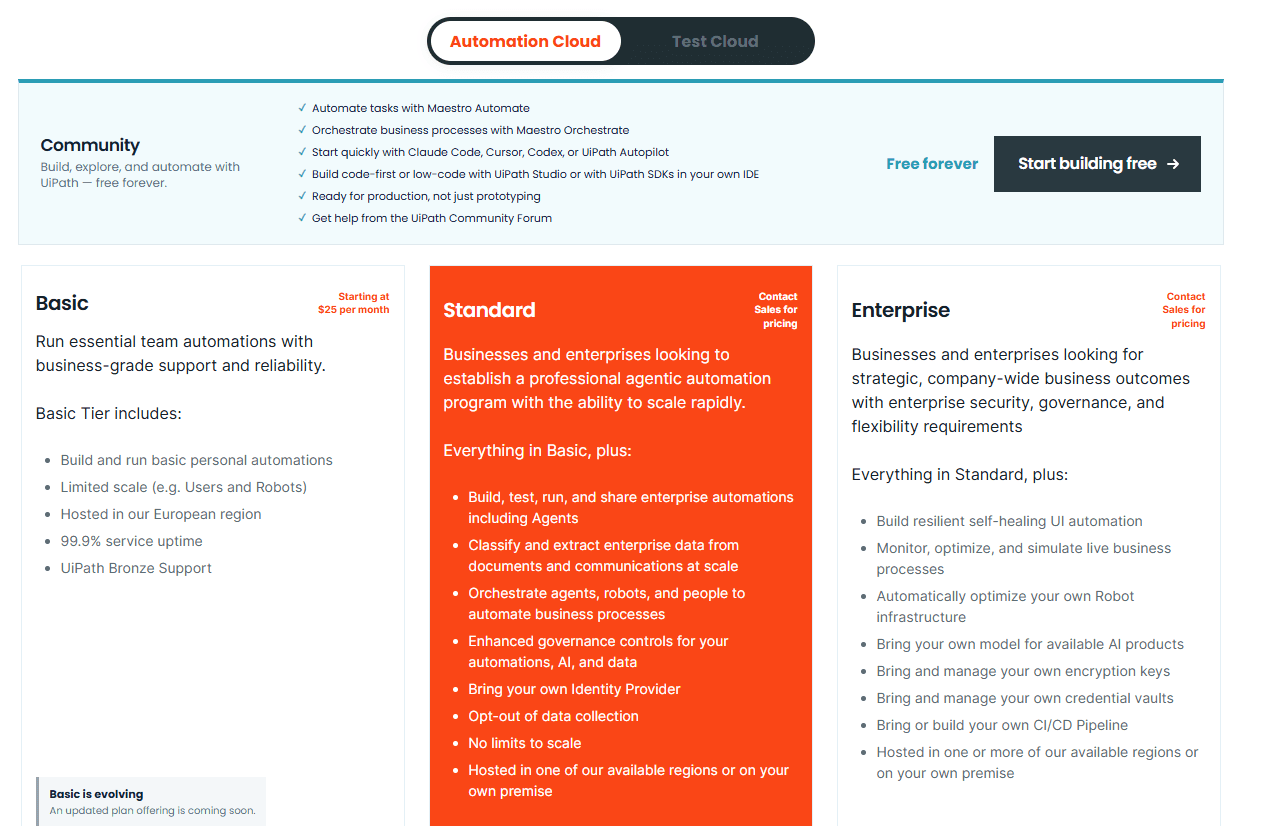
Users and robots: Basic, Plus, and Pro users and Unattended Robots can be bought on all three paid tiers.
Test Cloud (separate testing product, contact sales): Standard and Enterprise tiers for agentic software testing. Add-ons include Performance Testing at $20K per 2,500 virtual users, Screenplay at $10K per 50K runs, and Self-Healing at $5K per 5K heals, and Enterprise includes Screenplay and self-healing.
UiPath pros and cons
✅ The free Community plan is cleared for production use.
✅ Standard comes with a 60-day trial.
✅ Agents from Azure AI Foundry, AWS Bedrock, LangChain, and CrewAI can be governed from UiPath's registry.
❌ Users and robots may need license purchases on top of a plan.
Which Grok Bot alternative should you choose?
The right Grok Bot alternative will ultimately depend on who hands off the work and how repeatable that work is.
Here's how I see it based on your priority at the moment and the closest fit:
Your priority | Closest fit |
Agents for repetitive SOP work, chosen and measured with workflow data | Reflow |
An agent on its own cloud computer that also handles desktop apps | Sai by Simular |
Saving a finished task as a reusable skill inside a sandbox | Manus |
Agents inside an existing ChatGPT Business or Enterprise workspace | ChatGPT Work and workspace agents |
File-heavy tasks and scheduled reports on a Claude plan | Claude Cowork |
One teammate across Slack, iMessage, email, and meetings | Lindy |
Multi-agent Workforces with evaluation and deployment help | Relevance AI |
The biggest app catalogue for agent actions | Zapier Agents |
No-code agents governed inside Microsoft's stack | Microsoft Copilot Studio |
Agents working next to RPA robots across legacy systems | UiPath |
I’d make the argument that Reflow suits operations leaders whose teams run the same SOP hundreds or thousands of times a month and who want evidence of where an agent will pay back before anyone builds it.
Our workflow intelligence platform can measure each workflow before agents are built to the team's SOP, and it goes on measuring once the automation is live.
➡️ Book a demo to see how your own workflows would rank for automation. The Collective case study covers how the company reached $3.1M in annual cost savings.
Frequently asked questions
Which Grok Bot alternative suits enterprises best?
For enterprises, Reflow is the strongest Grok Bot alternative when agents need tight access control.
Each Reflow agent works from its own email address and laptop, so the company can revoke its access the way it would a colleague's, and the customer decides where people review the work.
Reflow also holds SOC 2 Type 2, HIPAA, GDPR, and CPRA/CCPA compliance.
Is there a Grok Bot alternative built for operations teams?
Yes, Reflow is built for operations teams that repeat the same SOP tens to thousands of times a month.
Our workflow data shows which processes are worth automating before an agent is built to the team's SOP, and the return is measured after launch.
Teams that already know which task to automate can start by recording it two or three times.
Can a Grok Bot alternative automate older systems with no API?
Reflow can, and back-office work on older systems without an API or MCP server is its strongest use case.
Our agents work through computer use, operating applications on screen the way a person would, and they follow the team's SOP step by step.
Tasks we've outlined include faxing a signed form to the IRS and preparing government filings.
What is the best Grok Bot alternative for individuals and small teams?
Sai by Simular is the best pick for individuals and small teams that want an agent with a computer of its own.
Sai works in desktop apps and terminals beyond the browser, on a Windows or Linux cloud computer or on the user's own Mac or Windows machine.
Pricing starts with a free Explore plan, and pay-as-you-go costs $50 a month.
⚠️ Disclaimer: This article was last updated on October 15, 2026. Contact us about any inaccuracies, and we'll verify and fix them.
See Reflow in action
A short demo, tailored to your operations.