Below are the 10 strongest Harvest alternatives for 2026, each with the buyer it suits and its current published pricing.
TL;DR
Reflow is the best Harvest alternative in 2026 for enterprise operations teams needing visibility into the work behind their billable hours. Our native agent records work time, active time, session time, and productive time without manual entry, then maps every workflow step by step. From that map, Reflow ranks the steps worth automating and keeps measuring after an automation goes live.
Toggl Track and Clockify are the closest like-for-like swaps for billable project work. Toggl Track is the stronger of the two on reporting, with profitability and utilization views. Clockify costs nothing for five users and reaches invoicing at $5.49 per seat.
Everhour and Timesheet build invoices from time recorded where the work starts. Everhour puts its timer on tasks in Asana, Jira, ClickUp, and similar tools, while Timesheet's phone timer can be started by a tap, an NFC tag, a Wi-Fi network, or a geofence.
Timely and TimeCamp fill in timesheets automatically: Timely drafts each person's timesheet for approval and takes no screenshots; TimeCamp's AI Time Tracking Agent sorts apps and websites into categories, and its free plan has no user cap.
Hubstaff and Apploye pair time tracking with payroll and client invoicing, and both offer screenshot monitoring.
DeskTime starts tracking at power-on and scores productivity per person and per team.
What are the best Harvest alternatives in 2026?
The best Harvest alternative in 2026 is Reflow, built for operations teams measuring the workflow behind each hour and making automation decisions from observed data.
For billable client work, Toggl Track and Clockify are the nearest equivalents, with billing rates and published per-seat prices.
Here’s each tool's strongest use and starting price:
Tool | What it does best | Starting price |
Reflow | Step-by-step workflow maps built from automatic capture, with automation priorities and post-launch ROI tracking. Requires no integrations or manual entry. | Not published; quoted after a demo. |
Toggl Track | Billing, profitability, utilization, and workload reports, with Calendar View for quick logging and a no-screenshot policy. | Free plan; paid from $9/license/month. |
Clockify | Invoicing and timesheet approval from the $5.49 Standard tier, on top of a free plan for five users. | $0 for 5 users; paid seats from $3.99/month (annual). |
Everhour | Timers on tasks in the team's project management tool, with budget alerts, automatic timer stops, and invoicing. | Free tier (5 seats); Team $8.50/seat/month, yearly, minimum 5 seats. |
Timely | AI-drafted timesheets (AutoSheet) from a private activity log, with no screenshots or keystroke logging. | From $9/user/month (yearly). |
TimeCamp | The lowest published paid rate here, an AI Time Tracking Agent, and no user cap on the free plan. | Free for unlimited users; paid from $2.99/user/month (annual). |
Timesheet | Timers started by NFC, Wi-Fi, or geofence, invoices from time entries, and the Chronis AI assistant. | Free for a single user; team plans from $10/user/month. |
Hubstaff | Approved hours paid out in multiple currencies, with monitoring settings chosen per team. | From $4.99/seat/month (2-seat minimum). |
Apploye | Payroll and client invoices on a free plan for 10 users, with screenshots and optional session recording. | Free tier (10 users); $4.50/user/month and up, billed annually. |
DeskTime | Per-person and per-team productivity scores from automatic tracking, with an AI Summary of each day. | From $6.42/user/month (annual). |
How were these Harvest alternatives chosen?
Every tool on this list passed three tests:
The tool has to do a job Harvest does today: Time capture, billable rates, invoicing, project budgets or profitability reporting (at least one) to a standard a Harvest customer would expect.
It has to fit a Harvest buyer: Harvest sells to professional teams that track client and project time, from freelancers on its Free plan to firms on Enterprise. Frontline clock-in apps and data-loss monitoring tools were left out, even where their features overlapped with Harvest's.
It has to be on sale today: Every tool listed is generally available, and anything marked coming soon is labelled in that tool's own section.
➡️ A note on scope: the list covers everything from a workflow intelligence platform to single-user timers, as firms leave Harvest for different reasons. Some want the same billing workflow at another price, and others want to see what happens inside the work.
#1: Reflow
For enterprise operations teams that already know where their billable hours went and now want to see how the work behind them runs, Reflow is the best Harvest alternative in 2026.
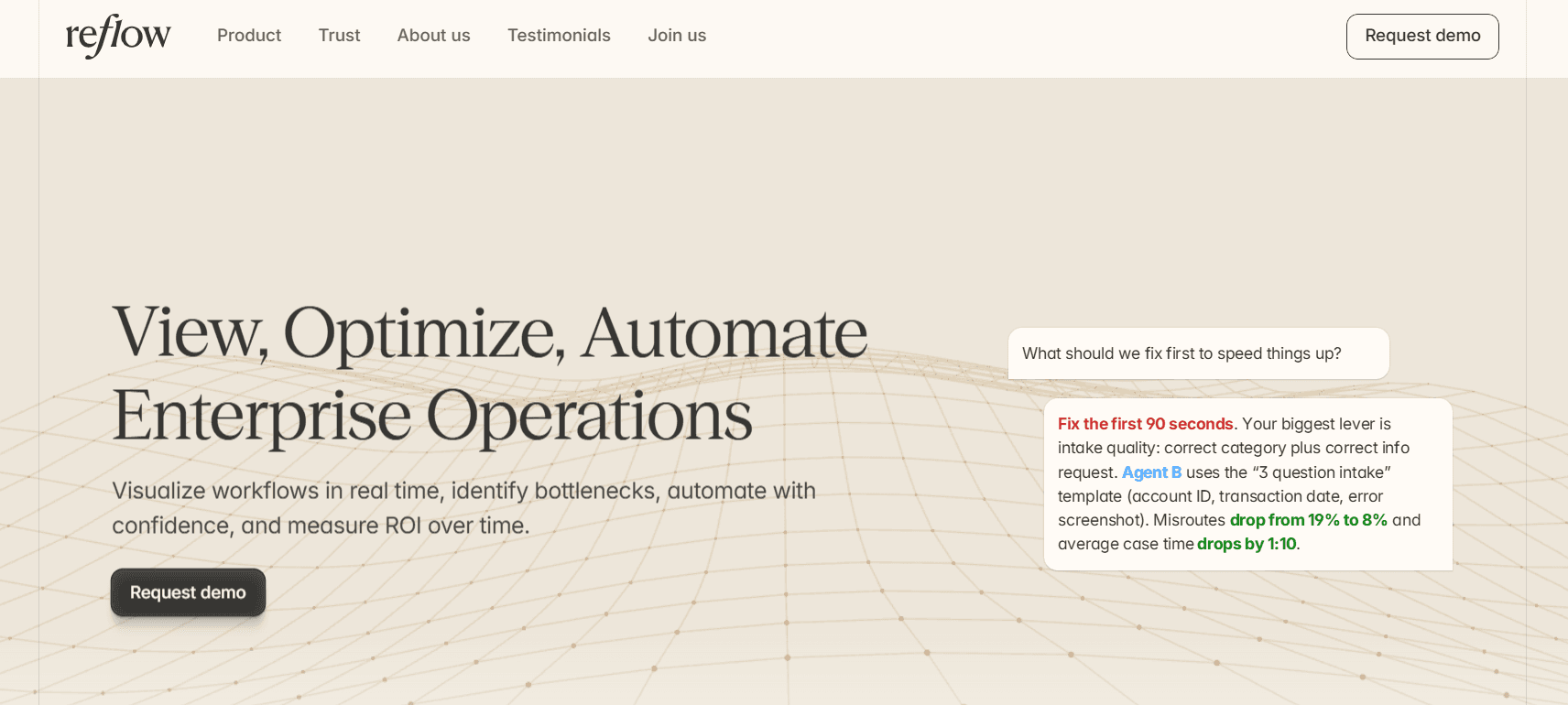
Our workflow intelligence platform covers the workforce metrics a time tracker would give you (active and session time, total work time, productive time, and each team's productivity trend), with none of it typed in by hand.
Above that base, every process gets a Reflow readout with figures a timesheet can't produce:
How many times the process ran.
The average time per run.
The average deviation per run.
Potential savings, in hours per month, if the process is automated.
Disclosure: Reflow is our own platform. The case for ranking it first is below, along with an honest list of the Harvest jobs Reflow doesn't do.
Reflow follows operational work live, logging each step along with the ones people skip, repeat, or hold up.
A desktop agent handles capture and machine learning handles classification, and because nothing has to be integrated, a first readout arrives within days.
➡️ Note: To be fair, Reflow isn't billing software. Per-hour invoicing, scheduling, and HR planning are all outside what it does. If your requirement is client invoicing or a schedule of who works on which project next week, Reflow wasn't built for that job, and Harvest and several of the alternatives below were.
Reflow's place at the top of this list comes from the following capabilities:
Step-level maps of each workflow
Every step of a workflow is recorded by Reflow in the order it happened, with elapsed time on each one, including steps that were repeated, skipped, or delayed.
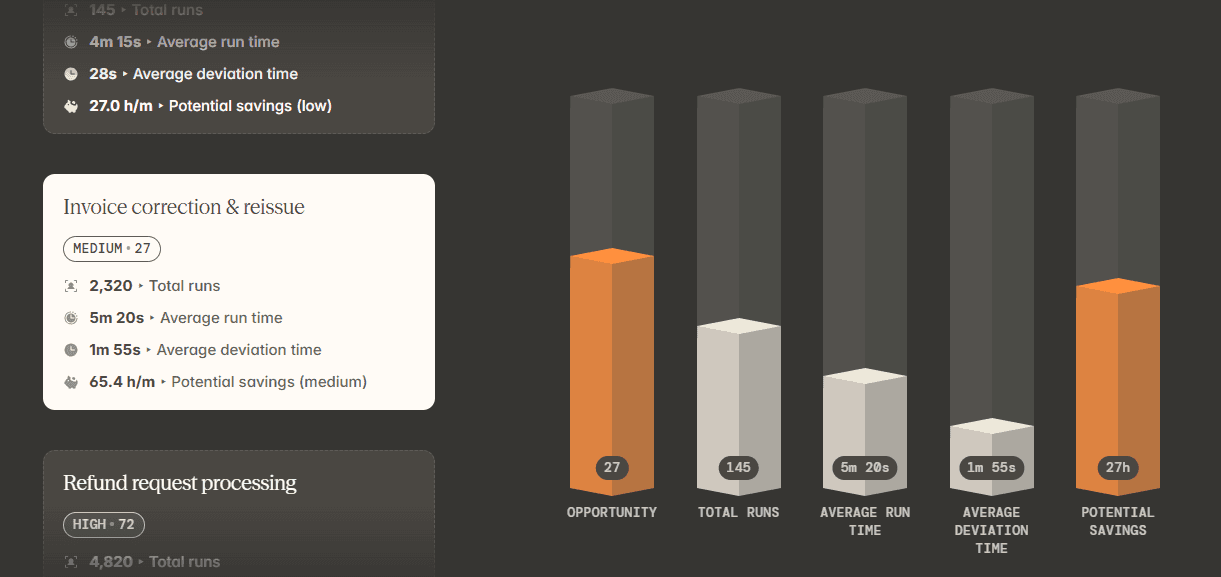
Invoice correction and reissue shows what that means for a billing team.
A timesheet records the hours the team logged against invoice corrections, which is exactly what a timesheet is for, but it can't show how many corrections were completed or where the time varied between them.
Reflow's example data for the process counts 2,320 runs.
A typical run takes 5 minutes 20 seconds, deviation averages 1 minute 55 seconds, and the estimated saving is 65.4 hours a month.
The timesheet gives the size of the job, and the readout shows where inside the process the time goes.
Unit economics for a single case
Reflow splits operational time by customer, task, and project, which lets a month of hours be expressed as a cost per case.
In Reflow's example data, subscription cancellation runs 3,608 times at 7 minutes 15 seconds per case, with 1 minute 35 seconds of average deviation.
Multiplied by the loaded hourly cost of whoever handles cancellations, those figures give finance the cost of one cancellation.

➡️ Harvest's profitability reports answer a related question at the level of a client engagement, and Reflow's figure answers it for a single case of operational work.
SOP adherence, checked on every run
Each SOP defines an expected sequence of steps, and Reflow checks every run against it.

Drift becomes visible in the data while the work is under way.
Data deletion requests are a useful case, since many privacy laws set response deadlines for them.
Reflow shows which runs skipped or repeated a step while the team still has time to correct the record, and the same view tells a team lead whether a documented procedure still describes how the team works.
Automation priorities with measured ROI
Reflow orders workflows by how much automation could return and points to the steps a machine could take over.
Measurement continues after a change goes live, so the return comes from observed runs.

Here’s an example: repeatable steps (lookups, copy-paste, and updates across multiple systems) take up 52% of a workflow's time, and for the Refund Requests SOP, Reflow recommends automating "lookup + populate + update."
Reflow projects the automated result at 25 seconds, saving 1 minute 40 seconds per case and eliminating missed-field errors.
Once the automation is live, the same readout keeps running, and an operations lead can see which figures moved before choosing the next process.
Our platform can also run the automation itself, keeping the recommendation and the results in one system.
💡 Reflow encrypts data both in transit and at rest and applies strict access permissions under a privacy-first collection model. Documentation of our security and compliance controls is in Reflow's Trust Centre.
Capture without a timer or timesheet
Everything in this layer comes from Reflow's desktop agent for Mac and Windows.
Machine learning labels each piece of captured activity with its project and type of work and rates it as productive or not, and manual time entry isn't possible anywhere in Reflow.
Nobody has to remember a timer, and nobody has to rebuild a week from memory before timesheets are due.
Task mining for the workflow layer runs on that same agent, and a person steps in whenever a classification needs judgment.
Headcount and average work time come from the same data, and so does everything in the two layers above.

How is Reflow different from Harvest?
Reflow measures the workflow, while Harvest measures billable time and carries it through to a paid invoice.
Our platform ends in an automation decision backed by measured results, while Harvest ends in billing: invoices built from tracked time and expenses, receivables, client payments, and profitability and utilization reporting.
Harvest is a well-established product, and for billable client work it's hard to replace.
Time is logged with a one-click timer, in daily or weekly timesheet views, or from connected calendar events, on web, desktop, or mobile.
Multi-Tiered Billing Rates choose the right rate by person, project, or task type, and clients can pay straight from the invoice.
Reflow began with a different question: how a process unfolds and which of its steps are better handled by automation.
We like to think of our model as a pyramid:
Workforce intelligence is the foundation, because optimizing a process on top of a wrong picture of how people work wastes the effort.
The middle layer, workflow intelligence, traces each process from start to finish, including its deviations, blockers, and errors.
Automation is the final tier, worth pursuing once the first two are solid.
Here’s how the 2 platforms stack up together:
Harvest | Reflow | |
Primary output | Invoices built from tracked time and expenses, with profitability and utilization reporting | Per-workflow figures for volume, run time, deviation, and estimated monthly savings |
Unit of measurement | Hours against clients, projects, and tasks, split into billable and non-billable | Each step of a workflow in sequence, with skipped and repeated steps counted |
How time is captured | One-click timer running in the background, daily or weekly timesheets, or entries from connected calendar events | Captured automatically by a desktop agent (Mac and Windows) |
Manual time entry | The main input, supported by custom reminders and notifications | Not allowed anywhere in Reflow |
Billing and invoicing | Multi-Tiered Billing Rates, Time & Materials and Fixed Fee projects, invoices, receivables, client payment from the invoice, and payroll from logged hours | Outside Reflow's scope |
Profit and cost | Profitability reporting by project and client (Enterprise) | Time and cost split by customer, task, and project |
Process checks | Timesheet Approvals, Require Notes, and an activity log (Enterprise) | Every run compared with its SOP |
Automation guidance | No equivalent feature listed on Harvest's site | Automation shortlist naming the steps to change, with results tracked after launch |
Integrations | 50+ core integrations across project management, accounting, and payments | No integrations needed; the agent observes work across systems |
Devices | Web, macOS and Windows desktop apps, and iOS and Android mobile apps | Mac and Windows |
Time to first data | Self-serve sign-up, plus a personalized consultation for teams of 50+ seats | Within days, after configuration by Reflow's team |
Security and login | SAML-based SSO with providers such as Microsoft and Okta (Enterprise) | SOC 2 Type 2 and HIPAA, GDPR and CPRA/CCPA support, encryption in transit and at rest, SSO and OAuth in base plans |
Trialling it | Free, fully functional 30-day trial with no credit card | Parallel trial next to Harvest or another tracker |
Pricing | Published: Free for 1 seat and 2 projects; Teams from $9 and Enterprise from $14 per seat per month billed annually, with usage-based charges as invoices, projects, clients, and tasks grow; Enterprise Plus on custom pricing | Not published; quoted after a demo |
Reflow pricing
We at Reflow haven’t published a price list to set against Harvest's plans, and pricing is quoted after a demo.
💡 Onboarding is white-glove.
Configuration is done by our team, and the trial can run in parallel with Harvest, which lets you check Reflow's figures against your own timesheets.
Firms partway through a contract with another tracker can have those terms matched for the first period.
Reflow pros and cons
✅ Time is captured by a desktop agent on Mac and Windows, and manual entry isn't possible.
✅ Workflows are mapped step by step, with skipped, repeated, and delayed steps shown.
✅ Every process gets a readout of volume, typical run time, deviation, and estimated monthly savings.
✅ SOP drift appears in the data while work is under way.
✅ Recommendations point to specific steps, and results are tracked once an automation is live.
✅ Setup needs no integrations or engineers, Reflow's team configures it, and a parallel trial against Harvest is possible.
✅ Base plans include SSO and OAuth. Reflow holds SOC 2 Type 2 and HIPAA compliance and supports GDPR and CPRA/CCPA, with collection settings you control and anonymized or aggregated reporting.
❌ Reflow doesn't send invoices or apply billing rates, so client billing still runs through Harvest or another billing tool.
❌ Pricing isn't published.
#2: Toggl Track
Best for: Firms struggling to get complete timesheets from everyone, who also need billable rates and profitability reporting.
Similar to: Clockify, Timely.

Toggl Track's design priority is adoption, with a timer quick enough for staff to keep using it and a stated position against screenshots and camera tracking.
Once the hours are in, the reports cover billing, profitability, utilization, and workload, with profitability analysis on Premium.
Features

Profitability reporting: billing, profitability, utilization, and workload views next to summary and detailed reports. Columns are customizable, and grouping goes up to three levels deep. Premium can also email reports on a schedule.
Hourly and fixed-fee billing: Starter introduces billable rates and project estimates with alerts; Premium supports fixed-fee projects and profitability analysis.
Cleaner timesheet data: approvals, required fields, locked entries, and team reminders on Premium. Toggl Track keeps an audit log as well.
Fast capture: Calendar View, described as Toggl Track's most-used feature, converts a calendar event into a time entry with one click. Beyond the web app, Toggl Track runs on desktop and mobile and as a browser extension.
Pricing
Toggl Track's paid licenses cost $9 per month on Starter and $14 on Premium in the first annual term, with Enterprise quoted and a free plan that has a user cap.
Free: $0, with a cap on the number of users. Tracking on web, desktop, and mobile, productivity reports, Google and Outlook calendar integrations, and over 100 integrations through the browser extension.
Starter: $9 per license per month, the first plan with billable rates. Project tasks and time estimates with alerts are included, along with revenue and productivity analysis and team collaboration features.
Premium: $14 per license per month in the first annual term, renewing at $18. Profitability analysis and fixed-fee projects are Premium features, and reports become fully customizable and schedulable. Timesheet approvals, the data accuracy features, SSO, and Jira and Salesforce integrations are also part of Premium.
Enterprise: quoted individually. One organization can hold multiple workspaces, and the plan comes with personalized onboarding, custom integrations, a dedicated customer success manager, and volume discounts on annual plans.

Toggl Track's paid plans can be trialled for 30 days without a credit card.
Pros and cons
✅ Background activity stays private to each person until they choose to turn it into an entry.
✅ Premium supports fixed-fee projects next to hourly ones, with profitability analysis on the same plan.
✅ Meeting-heavy days take less effort to log, since each calendar event converts in one click.
❌ Timesheet approvals and SSO both require Premium, which renews at $18 per license after the first year.
#3: Clockify
Best for: Small firms needing a free plan for up to five users and low-cost steps up to invoicing and SSO.
Similar to: Toggl Track, Jibble.
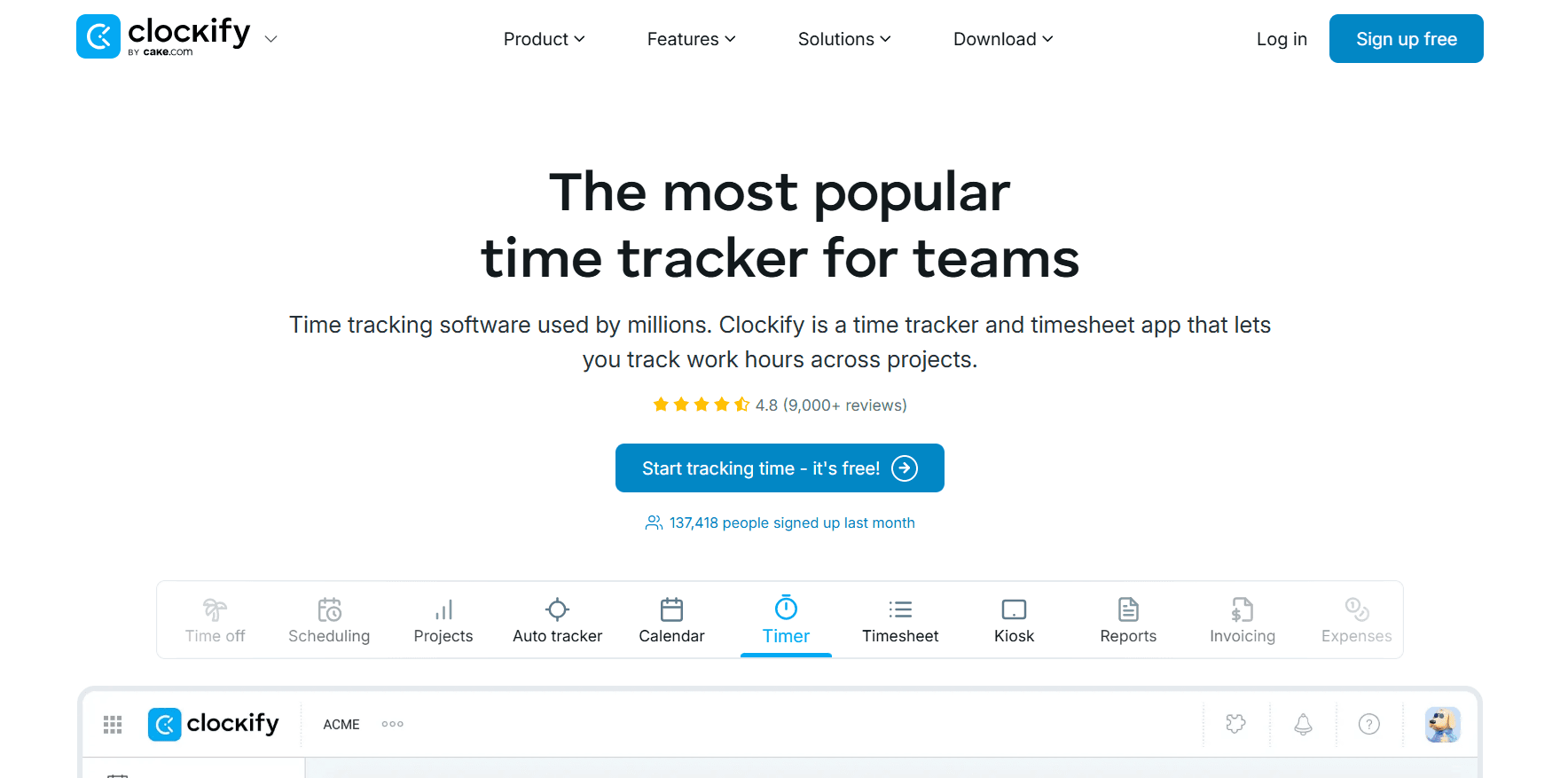
For a Harvest team, Clockify's closest equivalent is Standard at $5.49 per seat per month on annual billing, which includes invoices and recurring invoices, timesheet approval, locked time, and a QuickBooks connection.
At the bottom of the range, the Free plan gives up to five users the Timer, Timesheet, Auto tracker, and reports.
Features

Ways to log time: a Timer that runs live, a weekly grid in Timesheet, Calendar time-blocking, an Auto tracker that logs open apps and sites, and a Kiosk where a whole team clocks in from one tablet.
Billing: billable rates on Basic; per-task rates, rounding, invoices, and recurring invoices on Standard; labor cost measured against revenue on Pro.
Manager controls: approvals, locked periods, time off, attendance, and overtime from Standard, then scheduling of shifts and assignments, with forecasting, on Pro.
Pricing
Clockify offers probably the most generous free plan, as 5 users can use the platform for free with unlimited tracking. Paid tiers range from $3.99 to $11.99 per seat per month on annual billing.
Free: $0 for up to 5 users. Unlimited tracking through the Timer, Timesheet, Calendar, and Auto tracker, plus a Pomodoro timer, idle detection, tracking integrations, team activity, and reports.
Basic: $3.99 per seat per month on annual billing, $4.99 monthly. Kiosk, billable rates, required fields, time entry on behalf of others, bulk edit, time audit, imports, and project templates.
Standard: $5.49 billed annually, $6.99 monthly. Invoicing including recurring invoices, the QuickBooks integration, approval, locked time, attendance and overtime, time off, targets and reminders, and a manager role.
Pro: $7.99 billed annually, $9.99 monthly. Scheduling and forecasting, screenshots, activity monitoring, GPS tracking, labor cost and profit, budgets and estimates, expenses, custom fields, alerts, and email reports.
Enterprise: $11.99 billed annually, $14.99 monthly. SCIM provisioning, SSO, an audit log, control accounts, and a custom subdomain.
CAKE Bundle: $12.99 billed annually, $15.99 monthly, pairing Clockify's Enterprise features with Plaky for project management and Pumble for team communication.

Pros and cons
✅ From Basic upward, staff can pick whichever of the five entry methods fits their day.
✅ Enterprise identity controls (SSO, SCIM provisioning, an audit log) cost $11.99 per seat on annual billing.
✅ Every paid plan can also be billed monthly.
❌ Screenshots, scheduling, and labor cost all require Pro at $7.99 per seat, well above the $3.99 entry tier.
#4: Everhour
Best for: Project teams that plan client work in Asana, Jira, Monday, or a similar tool and need budgets and invoicing attached to the same tasks.
Similar to: Toggl Track, Clockify.

Everhour adds timers and estimates to each task, and budget status to each project, inside Asana, Jira, and the other supported project management tools.
Harvest users will find the budgeting and invoicing familiar, with threshold alerts and invoice export to Xero or QuickBooks.
Features

Budget control: budgets in hours or money for each project, email alerts at chosen thresholds, an automatic timer stop once the budget runs out, and a monthly reset for recurring work.
Client invoicing: Everhour assembles invoices from billable time for a chosen period, grouped by project and team member. Invoices go to QuickBooks or Xero, and Everhour tracks whether each has been paid.
Supported project tools: Asana, Jira, ClickUp, Monday, Linear, Basecamp, Trello, Notion, Wrike, and GitHub.
Approvals and leave: approved timesheets are locked against edits, and time off accrues automatically, with requests approved in Everhour.
Pricing
Everhour's only paid plan, Team, costs $8.50 per seat per month when billed yearly. Free covers up to five seats, and Custom pricing starts at 50 seats.
Free: $0 for as many as 5 seats, for time tracking, reports, projects and tasks, and data export. Every feature can be trialled for 14 days.
Team: $8.50 per seat per month on yearly billing, minimum five seats. Team unlocks every Everhour feature, including SSO, advanced permissions, native integrations, and invoicing with budgets.
Custom: quoted from 50 seats, for a dedicated manager, priority support, personalized demos, and volume discounts.

Pros and cons
✅ SSO is part of the standard Team plan.
✅ Timers stop automatically once a project's budget is spent.
✅ Leave accrual and approval run in the same tool as timesheets.
❌ Team requires at least five paid seats, a floor that very small teams pay for in full.
#5: Timely
Best for: Hourly-billing agencies and consultancies that need draft timesheets prepared for them, with a written commitment to no screenshots or keystroke logging.
Similar to: Toggl Track, DeskTime.

Timely drafts timesheets automatically for firms that bill by the hour, and each person approves their AutoSheet draft with one click.
The draft comes from the Memory tracker, a log of app and website use that stays private until approved, and Timely's written policy excludes keystroke logging and screenshots.
Features
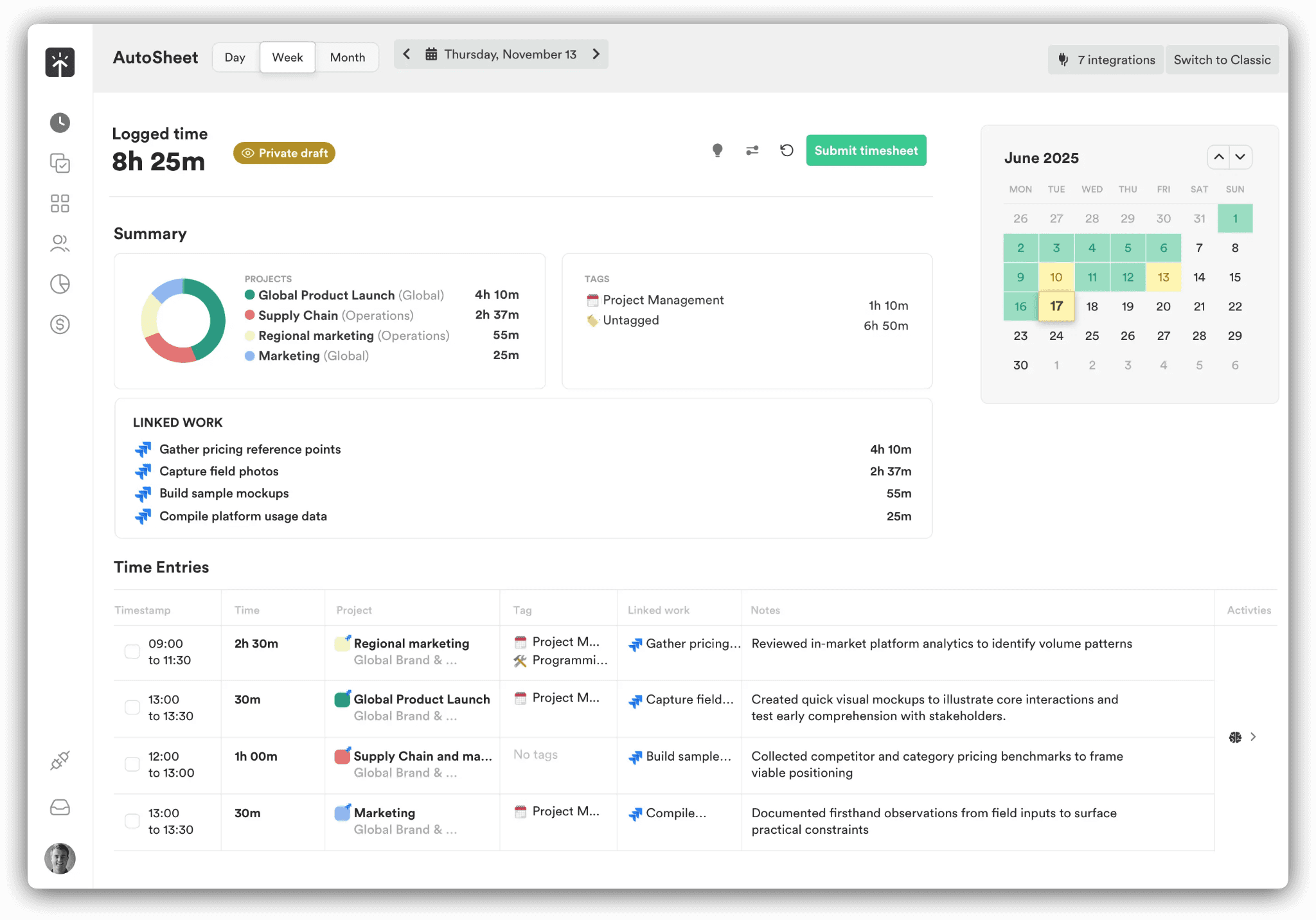
Drafted timesheets: AI categorization sorts captured time by client and project, and Timely estimates that completing a drafted timesheet takes under two minutes.
Capacity: the People dashboard shows capacity and the billable share of the week for each person, and flags where overtime is building up. Planned time is recorded as well.
Rates and budgets: billable hours reporting from Starter, and budgets and costs from Premium, which also syncs with accounting and project management tools.
Pricing
Timely's self-serve pricing runs from $9 to $22 per user per month on yearly billing, and Enterprise is arranged through sales.
Starter: $9 per user per month billed yearly ($11 monthly), capped at 5 users and 20 projects. API access, billable hours reporting, project health monitoring, AI categorization, and automatic time tracking.
Premium: $16 billed yearly ($20 monthly), up to 50 users with no project cap. Starter's features plus planning, budgets and costs, team management, and sync with project management and accounting tools.
Unlimited: $22 billed yearly ($28 monthly), with no user cap. Everything below it, and premium customer success, 50-plus currencies, Azure user management, overtime and undertime, and capacity management and reporting.
Enterprise: priced through sales, with priority support, monthly or quarterly reviews, team training, and tailored onboarding.
Tasks add-on: from $5 per person on any tier, covering assignment, scheduling, and progress against deliverables.

Pros and cons
✅ Timesheets arrive drafted, and Timely puts completion at under two minutes.
✅ Cost rates can be recorded next to billable rates.
✅ The Starter tier already includes API access.
❌ Capacity management and reporting require Unlimited, at $22 per user on yearly billing.
#6: TimeCamp
Best for: Price-sensitive firms of any headcount, since TimeCamp has the lowest published per-user rate here and invoicing from its first paid tier.
Similar to: Timely, Clockify.

TimeCamp's paid plans start at $2.99 per user per month on annual billing, and the Free plan has no cap on users or projects.
The AI Time Tracker is billed separately by token usage on every plan.
Features

Automatic timesheets: the AI Time Tracking Agent and AI Timesheets log time without clicks and sort apps and websites into categories, raising an alert when something needs attention.
Payroll preparation: attendance, overtime, and time-off records, timesheet approvals, and a time clock kiosk produce payroll-ready data.
Billing rates and invoicing: invoicing from Starter and billable time with budgets from Premium. Ultimate introduces billing rates, labor costs, and fixed-fee projects. Invoices export to Xero and QuickBooks.
Data for BI teams: on Enterprise, time data can flow to a warehouse or BigQuery, or into Power BI and Excel through API templates.
Pricing
Annual billing puts TimeCamp's Starter, Premium, and Ultimate plans at $2.99, $4.49, and $5.99 per user per month; paying monthly raises them to $3.99, $5.99, and $7.99. Enterprise is priced on request.
Free: $0 forever. Unlimited users and projects, timesheets, 2FA, apps for web, desktop, and mobile, and the AI Time Tracker metered on token usage.
Starter: $2.99 per user per month billed annually ($3.99 monthly). Free, with project templates, bulk edit, unlimited tasks, overtime tracking, time-off, Excel report export, invoicing, and an attendance calendar.
Premium: $4.49 ($5.99 monthly). Starter's set, and time rounding, budgeting alerts, scheduled email reports, private time, one integration, management roles, apps and websites tracking, budgets and estimates, billable time, and the Resource Planner.
Ultimate: $5.99 ($7.99 monthly). Everything in Premium, together with custom user roles, time entry history, SSO, fixed-fee projects, labor costs, unlimited integrations, screenshots, a pivot table, expenses, billing rates, timesheet approvals, remote work detection, and custom fields.
Enterprise: priced on request. Hosting can be self-managed or on a private cloud, and data can leave through a BigQuery pipeline, warehouse access, or Power BI API templates. The plan also brings custom reports, integrations, and activity categories, an audit log, user directory sync, an enterprise SLA, and onboarding and training.

Pros and cons
✅ At $2.99 per user, Starter already includes invoicing.
✅ Ultimate handles billing rates and fixed-fee projects for $5.99 per user on annual billing.
✅ Firms with strict hosting requirements can run Enterprise self-hosted or on a private cloud.
❌ Premium includes a single integration; unlimited integrations require Ultimate.
#7: Timesheet
Best for: Freelancers and small teams moving between clients and locations, where timers need to start on arrival.
Similar to: Toggl Track, Clockify.

Timesheet's single-user plans compete with Harvest's Free plan for individual freelancers, and its $10 Pro plan opens up invoicing and team features.
Tracking can start on its own when a Wi-Fi rule or a geofence triggers the timer on a phone or watch, or when the phone reads an NFC tag.
Features

Chronis AI assistant: Chronis logs time and controls the timer through chat, and it answers project questions.
Client billing: invoices built from time entries, with notes and expenses, PDF export, and payment tracking.
Location and NFC triggers: a tap, an NFC tag, a known Wi-Fi network, or a geofence starts the timer, which keeps running in the background. Break reminders can be scheduled.
Working-time rules on Business: employment models and contracts, working-time limits applied live, balances for leave and overtime, and an absence calendar with requests.
Pricing
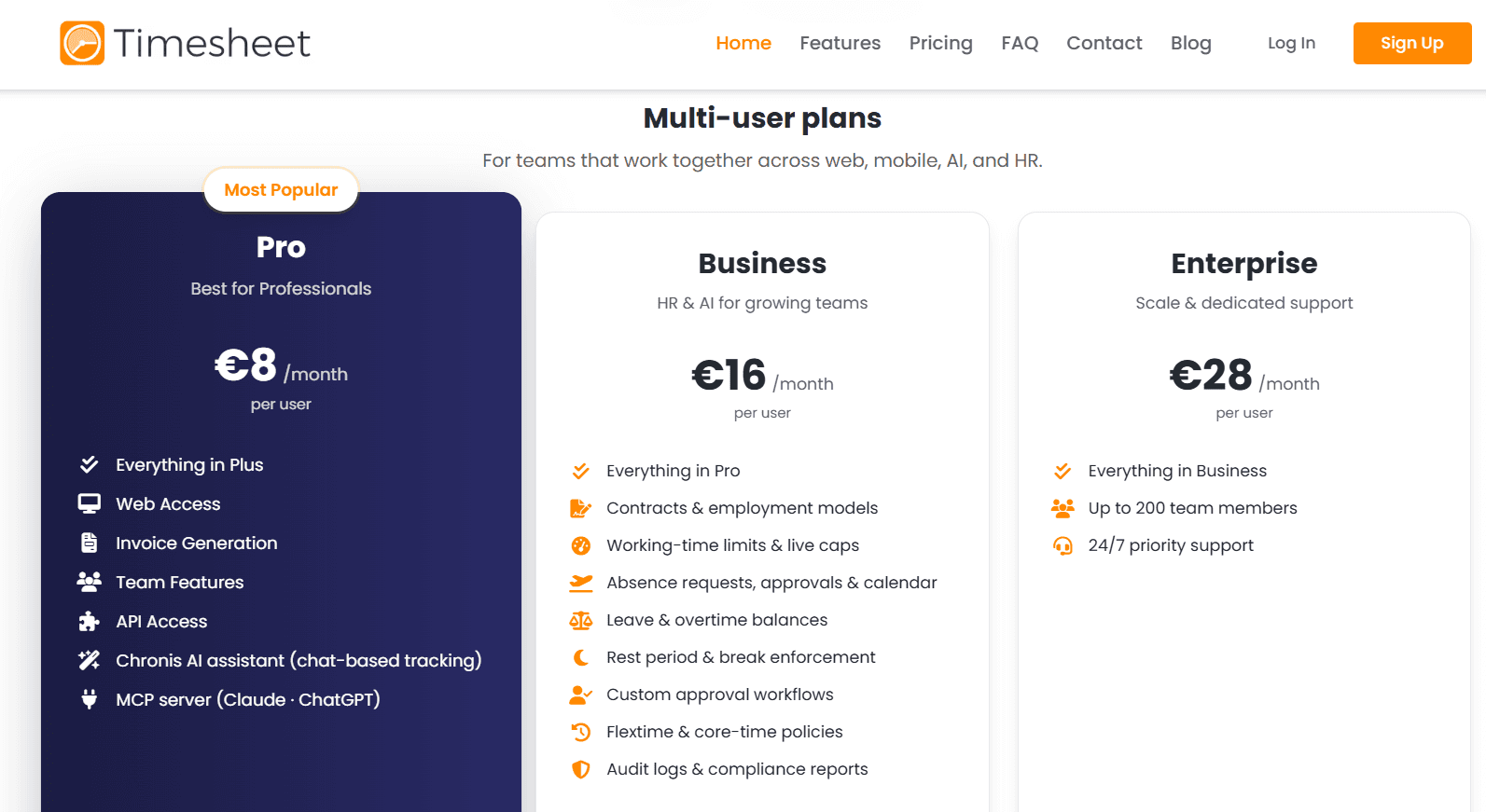
Two single-user plans cost $0 and $5 per month, and Timesheet's team plans run from $10 to $35 per user per month; yearly billing takes 10% off.
Basic (single user): free. Unlimited projects, time tracking, basic statistics, and export to Excel or CSV.
Plus (single user): $5 per month. Data is backed up to the cloud and synced in real time, and storage is unlimited.
Pro: $10 per user per month, the entry point for team features. Web access, API access, invoice generation, the MCP server, and Chronis are included.
Business: $20 per user per month. Business enforces rest periods, breaks, and live working-time caps, and supports flextime and core-time policies. The tier also holds contracts and employment models, leave and overtime balances, absence requests with approvals and a calendar, custom approval workflows, and compliance reports backed by audit logs.
Enterprise: $35 per user per month. The plan supports teams of up to 200 and comes with priority support around the clock.
Pros and cons
✅ A single user tracks for free with unlimited projects and spreadsheet export.
✅ Expenses and notes travel with each invoice, and payment status is tracked in the same app.
✅ The $10 Pro plan comes with API access and the MCP server.
❌ The free and Plus plans are single-user; team features begin on Pro at $10 per user.
#8: Hubstaff
Best for: Distributed firms paying team members from approved hours, where each team needs its own monitoring settings.
Similar to: Time Doctor, DeskTime.
Hubstaff carries tracked time through to payroll inside the product, paying approved hours in several currencies through Deel, Wise, PayPal, or Payoneer on the pay frequency the firm sets.
Time reaches that point from a timer or from GPS tracking for field staff, and monitoring intensity, up to optional screenshots, is set per team.
Features

Payroll and payouts: configurable pay frequencies and approval steps come before multi-currency payouts through the four providers above. Full payments and payroll require the Team plan.
Client budgets and invoices: client invoices are available from Starter and project budgets from Grow, while Team introduces client budgets and team invoices. Budget tracking shows spend and real-time cost and alerts before a project runs over.
Monitoring and Insights: activity rates and app and URL tracking, with screenshots as an option, configured per team. Insights looks at utilization and capacity gaps, classifies work, separates focus time from meetings, and detects unusual activity.
Field and background tracking: GPS tracking for field teams and the Silent app add-on (included on Enterprise) for background tracking on company devices, on top of the standard desktop, web, and mobile apps.
Pricing
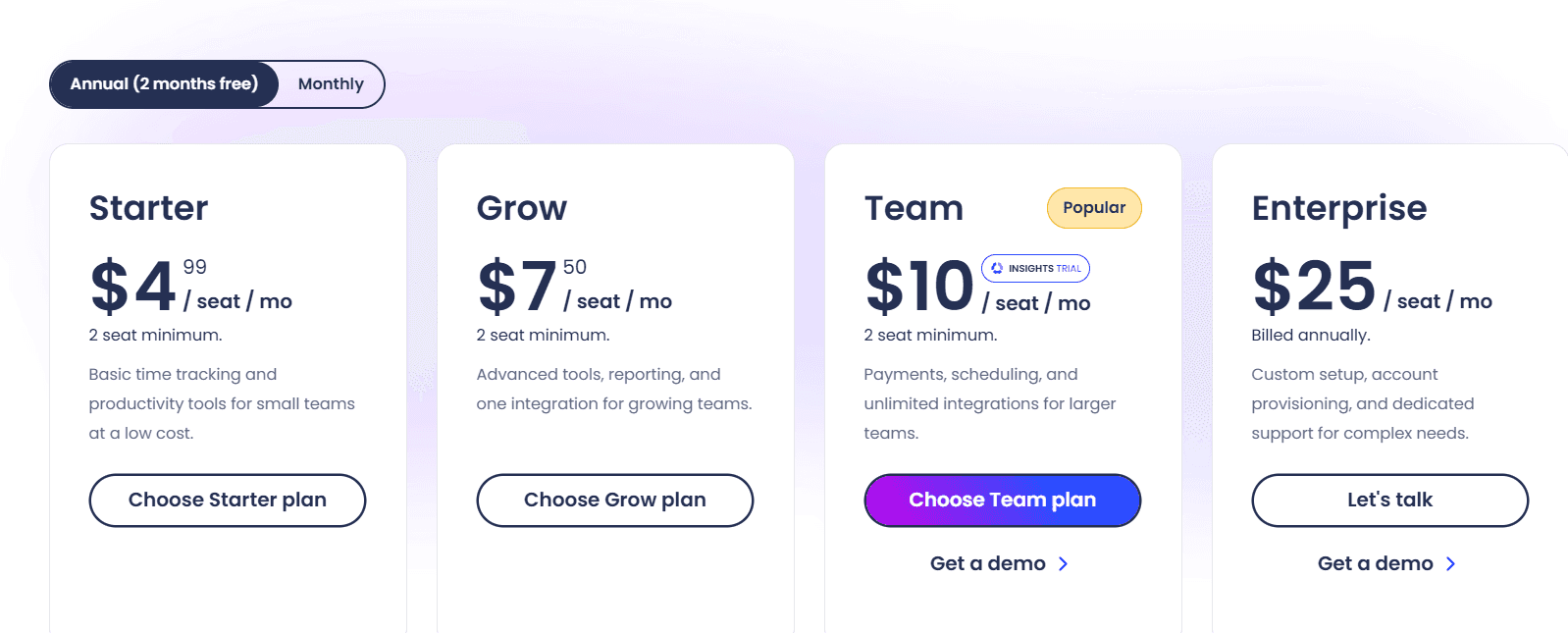
Hubstaff's Starter, Grow, and Team plans cost $4.99, $7.50, and $10 per seat per month and require at least two seats; Enterprise costs $25 per seat per month on annual billing.
Starter: $4.99 per seat per month. A multi-platform timer, timesheets and activity levels, 5 clients, client invoices, limited payments and payroll, and 500 screenshots and app and URL records per seat each month.
Grow: $7.50. Record limits rise to 1,500 per seat per month. Grow also introduces project budgets, idle time-out, Tasks, expense tracking, one integration, and email support within one day.
Team: $10. Full payments and payroll, team invoices and client budgets, and timesheet approvals, with scheduling and attendance, time off and holidays, and overtime for managing people. Unlimited integrations, audit logs, a limited public API, chat support, and a three-month Insights trial round out the plan.
Enterprise: $25 billed annually. Insights and Locations are included, as is the Silent app. So are SSO, SCIM and account provisioning, SOC 2 Type II and HIPAA compliance, concierge setup, an assigned account rep, and email support within two hours.
Add-ons, per seat per month: Locations $3.33, Insights $2.50, Silent app $2.50, Tasks $2.50, More screenshots $2.50, and Data retention $1.67.
Pros and cons
✅ Even the $4.99 Starter plan can issue client invoices.
✅ Teams paid in several countries can receive payouts in multiple currencies through four providers.
✅ Field teams can be tracked by GPS as well as through the desktop, web, and mobile apps.
❌ Starter and Grow cap screenshots and app and URL records at 500 and 1,500 per seat per month.
#9: Apploye
Best for: Budget-conscious remote teams that bill clients from tracked time and need screenshots and payroll on a free tier.
Similar to: Time Doctor, eMonitor.

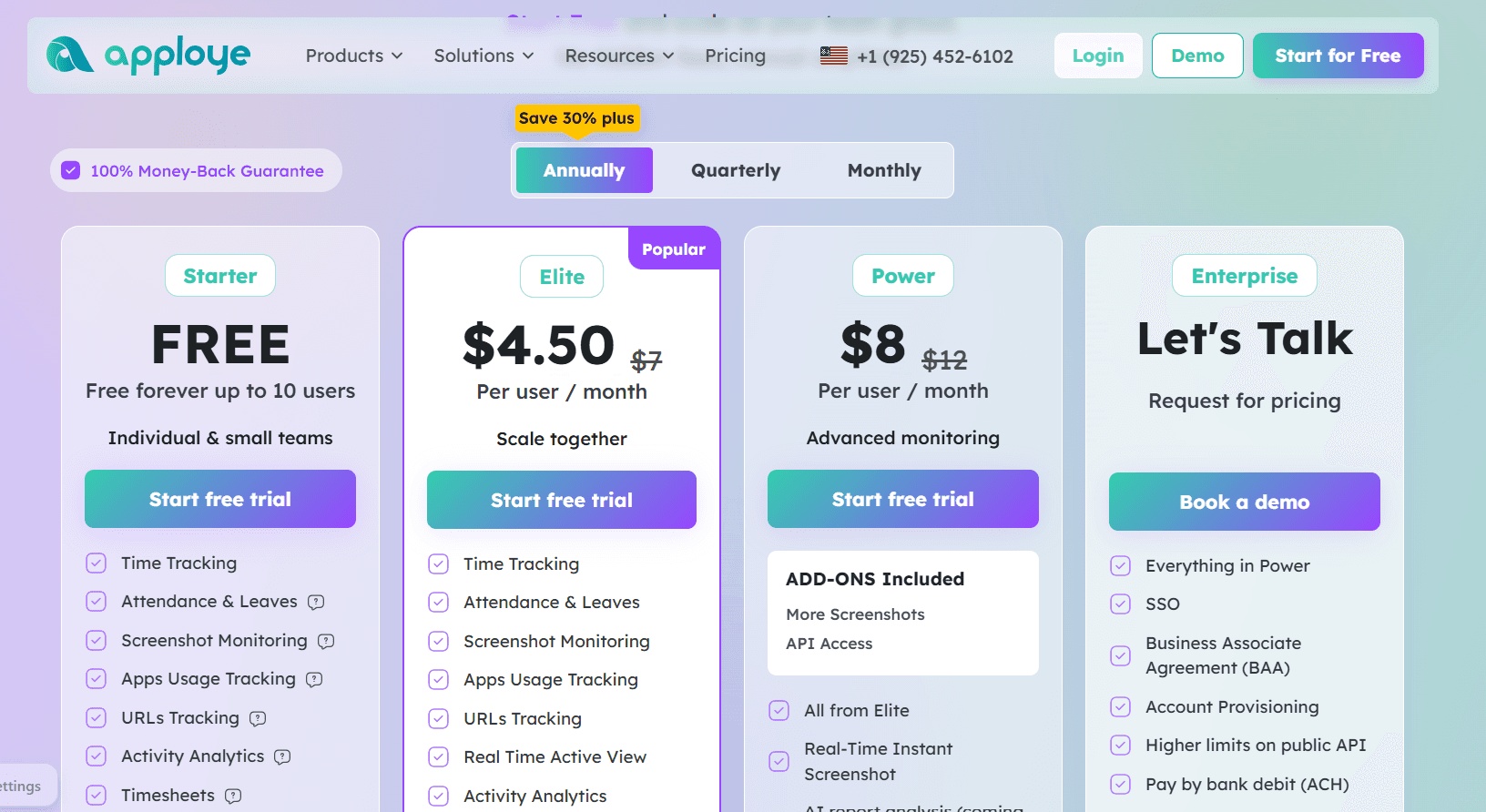
Apploye's free Starter plan covers up to 10 users and already includes payroll, client invoices, screenshots, and app and URL tracking.
Paid tiers extend visibility with Real Time Active View on Elite and instant screenshots on Power, and full session recording is sold as an add-on.
Features

Tracked time becomes client invoices, and payroll runs use a pay rate set for each member.
Live visibility comes from Real Time Active View and, on Power, instant screenshots. Periodic screenshots can be made more frequent with an add-on, and full session recording is sold separately.
Clock-in and clock-out are recorded automatically for attendance, and leave is managed in the same tool. Timesheets are generated automatically and go through an approval step.
Activity levels and app and URL tracking are standard: Custom reports require Elite, and Apploye lists AI report analysis as coming soon.
Apps run on Mac, Windows, Linux, iOS, Android, and Chrome: Stealth Mode is an add-on, as are on-premise hosting and white labelling.
Pricing
Apploye is free for up to 10 users, and its two paid tiers cost $4.50 and $8 per user per month billed annually:
Starter: free forever for up to 10 users. Payroll, projects, clients and invoices, timesheets with approval, time tracking, attendance and leaves, screenshot monitoring, activity analytics, and app and URL tracking.
Elite: $4.50 per user per month on annual billing (listed at $7), for custom reports, integrations, optional screenshots, and Real Time Active View.
Power: $8 billed annually (listed at $12). API Access and More Screenshots are included add-ons, and real-time instant screenshots are available. Apploye marks the AI chatbot and AI report analysis as coming soon.
Enterprise: custom pricing. The plan includes a Business Associate Agreement and SSO, with account provisioning and higher API limits. Guided onboarding, dedicated support, and ACH payment are part of it too.
Add-ons, per user per month: Screen Recording $4, More Screenshots $2, Stealth Mode $2, API Access $1, and White Labelling and On Premise at $3 each for teams of 100 or more. BigQuery is billed at $1,000 a month per organization.
Pros and cons
✅ Payroll and client invoicing are on the free plan.
✅ Linux and Chrome apps are available next to Mac, Windows, iOS, and Android.
✅ Attendance needs no manual clock-in, since Apploye records it automatically.
❌ Stealth Mode adds $2 per user and screen recording $4. Layered onto Elite at $4.50, the monitoring depth a Veriato team would expect takes the seat past $10.
#10: DeskTime
Best for: Firms measuring productivity across the whole working day, where staff never start a timer and managers need document-level detail.
Similar to: Time Doctor, Timely.

DeskTime records the full working day automatically and scores productivity from the apps, websites, and document titles each person has open, email subject lines included, with an AI Summary written up for each day.
Features

Tracking starts at power-on and needs no input from staff: DeskTime detects idle time and lets people add offline time, and meetings and video calls are recognized and kept out of idle time.
Productivity is scored per person and per team from the apps and websites in use and the titles of open documents.
Time is logged against tasks and projects, and absences are recorded in a calendar. Premium also offers shift scheduling and proof-of-work screenshots.
Pricing
DeskTime lists Pro at $6.42 and Premium at $9.17 per user per month, billed annually and excluding VAT. Enterprise is quoted for teams of 200 or more.
Pro: $6.42 annually. Aimed at small teams and startups, Pro includes productivity calculations, document title tracking, and calendar integrations for Google and Outlook.
Premium: $9.17 annually. Shift scheduling, screenshots, and integrations with API access (Jira, Asana, Zapier, and more) unlock at this level.
Enterprise: custom pricing for 200-plus users, with employee training, an account manager, and a custom API on request.

No credit card is needed for DeskTime's 14-day trial, and a year paid upfront comes with one free month.
Pros and cons
✅ Calls and video meetings aren't counted as idle time.
✅ Scores roll up to team level as well as per person.
✅ Employee training is part of the Enterprise plan.
❌ Pro leaves out screenshots, the API, and the Jira and Asana integrations; each needs Premium at $9.17 per user.
Which Harvest alternative should you choose?
Reflow is the right choice when the goal is to see inside each workflow and decide what to automate.
For other priorities, the table matches each of the nine time trackers to the need it serves best.
If the next priority is | Start with |
Seeing inside each workflow and deciding which steps to automate | Reflow |
Profitability and utilization reports with a no-screenshot policy | Toggl Track |
A free start for five users, then invoicing at $5.49 per seat | Clockify |
Budgets and invoicing on tasks already planned in Asana or Jira | Everhour |
Timesheets drafted from a private activity log and approved by each person | Timely |
The lowest published per-user price and no cap on free users | TimeCamp |
Freelance and mobile work, with timers that start by location | Timesheet |
Paying team members from approved hours in multiple currencies | Hubstaff |
Free payroll and invoicing for teams of up to 10 | Apploye |
Productivity scoring across the full working day | DeskTime |
Firms don't need to give up Harvest to use Reflow.
Reflow has no invoicing or billing rates, and with nothing to integrate, it can measure operational work while Harvest keeps producing invoices.
A parallel trial shows what Reflow's data adds before any decision.
➡️ Book a demo to see your own operation mapped, or read how Collective turned that visibility into $3.1M in annual cost savings.
⚠️ Disclaimer: Details in this comparison were last updated on October 1, 2026. Vendors update features and pricing often, and we fact-check any inaccuracy reported to us.
See Reflow in action
A short demo, tailored to your operations.